


Did you know that 60% of the world’s corporate data is safely stored in the cloud? With cloud infrastructure reaching $271.5 billion at the end of 2025, and $355.81 billion by 2029. Cloud hosting architecture is the key ingredient that shows the scalability, speed, and reliability of modern applications and websites. Our goal was to build a cloud structure that can produce consistent performance, handle massive workloads, and anticipate the future.
This developer-friendly article helps you understand how we were able to build our scalable cloud V6, the problems we encountered, how we were able to solve them, and the lessons we learned.

How to Integrate Google Analytics with WordPress (In 4 Steps)
By Favour Brown on September 6, 2025Table of Contents
- The Limits of IPv4
- Why We Decided to Go for IPv6
- Designing the Network from the Ground Up as a Cloud Provider
- How Traffic Flows Across the Cloud
- The Big Picture: From User to Container
- The End Result of Our Scalable Cloud Computing
- Challenges We Faced When Building Highly Scalable V6 Cloud Hosting
- What We Learned
- Conclusion
- FAQs
Key Takeaways
- IPv6 cloud service removes the complexity of NAT and IPv4 limitations to give global networks that are effective and fast.
- By building highly scalable IPv6 structures, we were able to achieve better traffic routing, build a scalable infrastructure, and support millions of simultaneous connections.
- Every container in our cloud computing server receives a routable IPv6 address to make communication, service, discovery, and observability simple across Kubernetes clusters.
- Different challenges, like improving IPv6 tool support and debugging dual-stack environments, lead to better operational expertise and the strengthening of the resilience of our network.
- Our transition as a cloud provider to IPv6 gave birth to cleaner networking, global scalability, and readiness for future internet traffic.

Power Your Business Infrastructure
Ditch shared limits and switch to VPS. Grow confidently with our VPS hosting that is optimized for security, uptime, and performance.
The Limits of IPv4
IPv4 was developed long before the existence of containers, virtualization, or large-scale cloud servers in the 1980s. The limitation of the fully automated network led to deficiencies in the following areas:
- Address Exhaustion: IPv4 provided more than 4 billion unique addresses, which were not enough to maintain the workloads of today’s devices and cloud, like Google Cloud Platform.
- NAT Complexity: In order to tackle space, NAT decodes private IPs to public ones. This led to complex debugging, breakage in end-to-end connectivity, and latency.
- Scalability Issues: As nodes and internal services continue to increase, areas like overlaps, handling subnets, and the routing table encounter more errors
Why We Decided to Go for IPv6
With millions of virtual machines, containers, and internal services interacting across different data centers, the reliance on and the limitations of IPv4 on Network Address Translation (NAT) became a problem.
When we initially began building the future of cloud infrastructure for people on reseller hosting or other plans, we realized that IPv4 wasn’t the best solution. Our highly available IPv6 solved these problems by:
- Using a 128-bit address space to give virtually unlimited addresses
- Not using NAT for every container, node, and service. The aim was to get an address that can be routable globally.
- Simplified routing that included cleaner traffic paths and fewer translation layers.
- Integrated performance and security features, such as extension headers and neighbor discovery.
If your goal is to host a WordPress site that performs seamlessly on IPv6 infrastructure, you will need the best WordPress hosting providers that offer optimized environments for modern CMS deployment.
Designing the Network from the Ground Up as a Cloud Provider
Our cloud services, like VPS hosting, run an IPv6 internal network that can automate configuration, scale effortlessly, and remain adaptable under heavy traffic. In addition to that, our best practices were “Making public-facing services like (IPv4 + IPv6) to be dual-stack for compatibility, and making every component of the data center to be only IPv6.”
1. Our Architectural Blueprint
At the heart of our architectural blueprint are self-contained pods and compute clusters designed to manage a set of workloads. Inside each pod are several containers, nodes, and load balancers that are interconnected.
Here’s the basic flow:
- Users → Edge Layer (dual-stack: IPv4 + IPv6)
- Edge → Pod Layer (IPv6-only, internal communication)
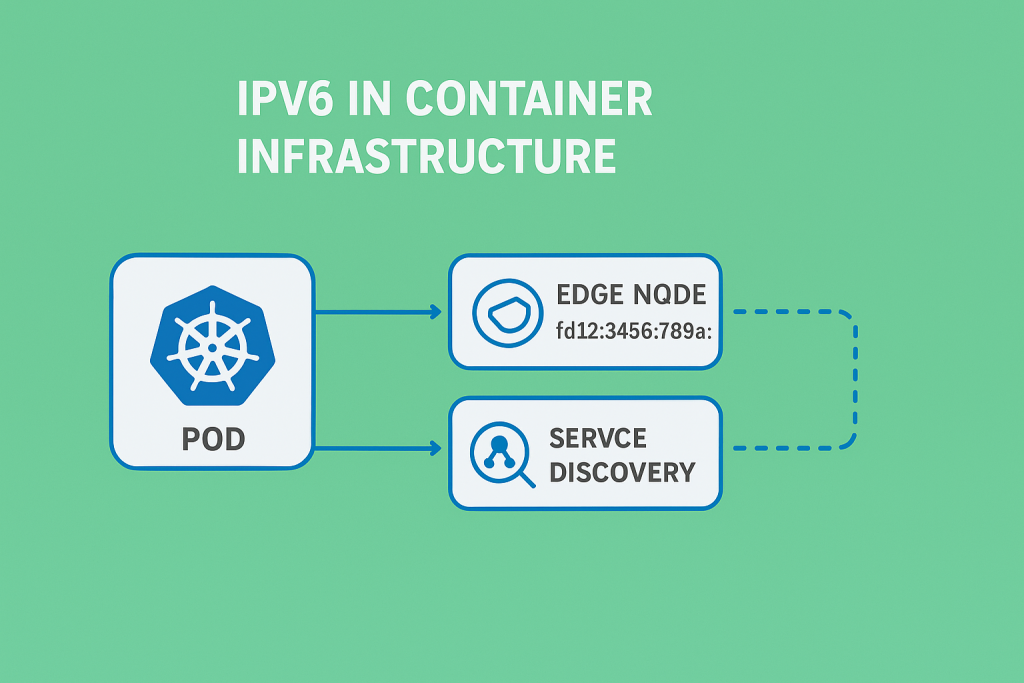
- Pods → Services (direct IPv6 addressing between containers)
Each container and node directly interacts via routable IPv6 addresses instead of using NAT gateways or overlays. This helps our web application and optimized CRM hosting services to stay transparent, clean, and predictable.
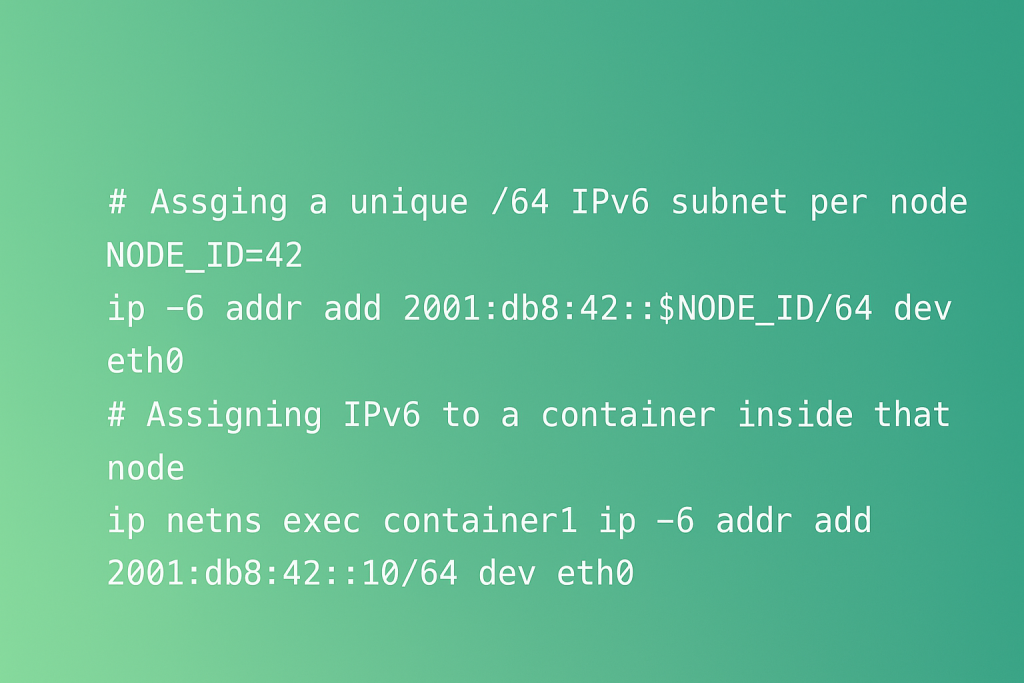
With the design above, we ensure that each container has the best cloud IP without any complexity, translation, or port conflicts.
2. Traffic Routing and Load Distribution
To efficiently route traffic to hundreds of nodes, we use Border Gateway Protocol (BGP) and Equal-Cost Multi-Path Routing (ECMP) together. We use FRRouting because each node runs a lightweight version of the BGP daemon to announce its service prefixes to the Top-of-Rack (ToR) switches.
After switching, the incoming traffic is distributed evenly to available nodes to make them more scalable for our windows hosting users. This free-tier setup produces a dynamic network that is fully meshed for new nodes to advertise their availability automatically without any manual reconfiguration.
3. Service Discovery and Anycast VIPs
For public entry points, our services use brackets to wrap Anycast Virtual IPs (VIPs). Several edge nodes use BGP to broadcast the same VIPS to the network. Traffic is routed automatically to the closest node, increasing fault tolerance and reducing latency.
This queue allows us to preserve our geo-distributed load balancing without using external load balancers. Our service discovery is self-healing, fast, and scales horizontally as more edge nodes are online.
4. Automation from Day One
With a strong focus on automation from day one, we used Terraform and Ansible to fully automate provisioning and routing. New nodes are automatically discovered via Link Layer Discovery Protocol (LLDP) and configured with CI/CD pipelines to make email hosting campaigns effective.
By seeing the configuration of our network as code, we can test changes, bring new updates, and quickly recover from failures while preserving a constant state across our entire network of servers.
5. A Foundation Built for Scalability
Do you need more capacity? Our CDN is designed to join the mesh automatically as we plug a new rack to handle domain traffic and announce prefixes. This helps to reduce downtime, IP conflicts, and readdressing.
This unique CPU design is the foundation for our IPv6 cloud and is made to be fully automated, simple, and predictable. Furthermore, our network is built to be resilient, fast, and manage the future of the internet.
How Traffic Flows Across the Cloud
After creating the backbone of our IPv6 network, the next problem was to produce a seamless flow of traffic from the request of the user at the edge to the container supplying the response in the network.
Our goal was to have a system that is strong enough to control millions of concurrent requests, recover instantly, and share load intelligently when nodes are offline without having any centralized bottlenecks.
The answer we eventually came up with was a complementary website migration and BGP-driven traffic flow that is distributed, powered by ECMP routing, and Anycast VIPs.
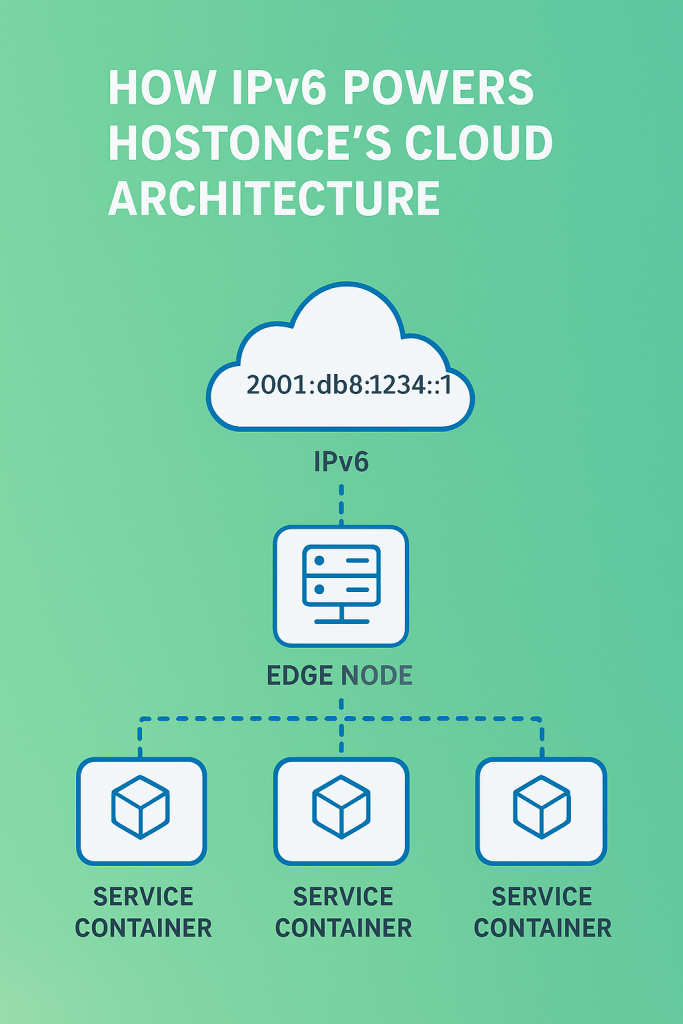
The Big Picture: From User to Container
Here’s the big picture on how traffic moves from user to container through our cloud server:
- The request of a user reaches our DNS, which resolves to an Anycast IPv6 address that is globally distributed.
- Thanks to the route optimization of BGP, the client can join the closest edge node.
- The edge node inspects routing metadata and removes SSL/TLS.
- The request is internally sent via IPv6 links to a target pod that is hosting the service.
- A container directly responds to the client via the same IPv6 path.
In summary, we can say that the path looks like this:
<pre><code class=”language-text”> [User] → [Edge Node] → [Pod Gateway] → [Service Container] </code></pre>
Every step is natively routed through IPv6, eliminating translation overhead and making sure that there is full visibility end-to-end.
When deploying a scalable IPv6-only cloud, businesses often ignore reliable email communication. A highly scalable V6 deserves an affordable email plan. Check out our guide to the best cheap email hosting providers on the market to help simplify your decision
The End Result of Our Scalable Cloud Computing
By taking a serverless network to build on BGP, IPv6, Anycast, and ECMP, we have successfully designed a network that can be:
- Self-healing by allowing routes to automatically adapt to changes
- Efficient enough for traffic to use the path that is the shortest and healthiest
- Scalable without having a single controller limit performance.
This system is the reason why Hostonce high-availability cloud is evenly distributed, fast, and made to be scalable as we continue to grow globally.
Challenges We Faced When Building Highly Scalable V6 Cloud Hosting
When it comes to building a V6 hosting plan that is highly scalable for our customers, we encountered and overcame the following challenges:
1. Limited IPv6 support across tools
We found it difficult to use CDNs, DNS resolvers, and platforms that can support IPv6. To tackle this issue, we changed DNS resolvers that are IPv6-compatible and used self-hosted Prometheus exporters. This ensures that every packet stays inside our IPv6 network and works with the best WordPress responsive themes.
2. Debugging Dual-Stack Environments
Temporarily running IPv6 and IPv4 during migration leads to asymmetric paths and complex routing loops. For example, a request made by a user may enter through IPv6 and respond via IPv4, causing session drops for shared hosting users. We were able to tackle this by implementing strict IPv6 routing policies and confirming paths with tcpdump -i eth0 ip6 and traceroute6 2001:db8::80
3. Application-Level IPv6 Issues
Some legacy applications, like EC2 and AWS, were not compatible with IPv6 sockets. Hardcoded libraries for IPv4, like socket(AF_INET, SOCK_STREAM), would not perform efficiently in IPv6 environments. We solved these scenarios via socket(AF_INET6, SOCK_STREAM) and designed a unit test suite to automatically locate IPv4 dependencies during the deployment stage.
4. Staff Training and Debugging Tools
Our developers and engineers were only experienced with IPv4. This led to errors when we used IPv6 subtleties like address scoping or link-local addresses. To curb this challenge, we hosted internal workshops for our staff and developed specific runbooks for IPv6 with real use cases
Speed and scalability go hand in hand with responsive design. Once your IPv6 cloud environment is ready, pair it with one of the top 10 WordPress responsive themes to deliver a seamless experience across all devices
Expert Tip
IPv6 has different behaviors than IPv4 especially with neighbor discovery and auto-configuration. It is very important to use IPv6-aware firewalls like nftables or ip6tables, and disable unused IPv6 features to prevent potential vulnerabilities.

What We Learned
- IPv6 Simplifies, Not Complicates: After transitioning to IPv6 environments, our network became cleaner and no more complex translation rules, NAT layers, or overlapping subnets. Every container came with a unique, traceable address.
- Automation Is Non-Negotiable: By codifying every configuration change and network in Ansible & Terraform, we were able to prevent drift and gain full reproducibility. This process now expands to every area of our structure, from DNS records to routing policies.
- End-to-End Visibility Is Everything: Integrating Grafana, Prometheus, and Loki while monitoring IPv6 routes led to better uptime and faster troubleshooting. This end-to-end visibility showed us that communication is more than having standard dashboards and reliable email hosting plans.
- Training is as Important as Technology: The adoption of IPv6 is a mindset. We heavily invested in operations and developer training to ensure that everybody in our team can test, trace, and confidently troubleshoot IPv6.
- Future-Proof Design Pays Off: By using IPv6, we designed a foundation that can scale globally without having the headaches of traditional IP exhaustion. As we open new edge locations and data centers, our IPv6 is future-proof against frictions when it comes to network expansion
Conclusion
Building highly scalable V6-only cloud hosting was a major milestone for us because it changed our perspective on the working process of modern hosting. From automating deployments to changing our cloud backbone, we were able to achieve a platform that is leaner, faster, and trustworthy for WordPress.
As the global economy moves to IPv6 Internet, we are happy to jump in early. This major development allows our network to accommodate future changes and stay scalable for users. Get more behind-the-scenes information about our operations and network through our Twitter (X) page.
FAQs
How does IPv6 improve cloud hosting architecture?
IPv6 enhances cloud hosting architecture by offering a larger address space, eliminating the need for NAT, and enabling faster, more efficient routing. It also simplifies container networking and supports seamless global scalability.
Why did Hostonce choose an IPv6-first cloud hosting architecture?
Hostonce adopted an IPv6-first approach to future-proof its infrastructure. This ensures better scalability, improved load balancing, and simplified automation — all essential for a high-performance cloud environment.
What challenges come with migrating to IPv6?
Common challenges include limited IPv6 support in older tools, debugging dual-stack environments, and training teams to adapt to new network configurations. However, with automation and monitoring, these can be efficiently managed.
Is IPv6 hosting compatible with all applications?
Most modern applications support IPv6, but legacy systems may require updates or patches to ensure compatibility. Testing in a staging environment helps ensure smooth transitions.
WordPress 6.3 Release Leads Overview
By Aliza Irfan on November 10, 2025
Hostonce is the #1 WordPress Host
Ranked by 930+ customers in G2's Best Software Awards.
