


Owning a good WordPress site in this era encompasses even more than handling content and plugins. It’s about organizing teams, clients, and juggling an entire project in a structured manner from start to finish. There is a 2022 report by Team Stage stating near 70% of projects collapsing is a consequence of ineffective communication and planning, and 77% of high-performance teams utilize project management systems in order to coordinate and punctual deadline delivery.
Everyone needs good management systems, whether it is a freelance developer working on multiple projects, a digital agency working on multiple site builds, or a content team that has to update and sync on a continuous basis. Good project management and systems is crucial in keeping your respect and streamlining your output.
Top 10 WordPress Project Management Plugins for Streamlined Workflow in 2026
By Javeria Riaz on October 12, 2025Key Takeaways
- In 2026, more than ever, project management will be contingent on smart and flexible tools that fit your business needs best.
- Integration management systems as plugins allow for streamlined systems and management directly from your dashboard.
- Efficient management plugins can enhance communication, collaboration, and task tracking with clients.
- Essentially, Go for WP project manager, Projectopia and Zephyr. These are popular systems and even more, great tools for all sizes of teams.
- Always take team size, budget, integration needs, and ease of use into account when choosing a plugin.
- Utilizing free versions allows you to determine which one best suits your workflow.
Table of Contents
- Why Use a Project Management Plugin in WordPress?
- Top 15 WordPress Project Management Plugins for 2026
- 1 – WP Project Manager Pro
- 2 – Panorama
- 3 – Zephyr Project Manager
- 4 – Projectopia
- 5 – UpStream
- 6 – SP Project & Document Manager
- 7 – Kanban for WordPress
- 8 – Task Manager Pro
- 9 – Monday.com Integration for WordPress
- 10 – Trello Integration via WP-Trello
- 11 – WP ERP (Project Management Module)
- 12 – Freedcamp Integration
- 13 – WP Client Portal
- 14 – Projectify
- 15- Airtable Integration for WordPress
- Conclusion
- FAQ
Why Use a Project Management Plugin in WordPress?
A project management plugin is a powerful tool that helps you plan, organize, and monitor projects directly from your WordPress dashboard. It brings all your essential management features, such as task assignments, progress tracking, file sharing, and communication, into one centralized space. There is no need to depend on external programs or email chains. You can do everything within your WordPress site.
Benefits extend well beyond mere convenience. Here are some offered by a project management plugin:
- Centralized control: Manage projects, deadlines, and team communication all in one location.
- Improved collaboration: Keep your team and clients connected with shared task boards, discussions, and updates.
- Reduced dependency on third-party tools: Eliminate the need for separate platforms like, saving both time and costs.
- Enhanced productivity: Automate workflows, track milestones, and maintain transparency across your projects.
- Greater control: Everything is in one place: the projects, the deadlines, and the communication with your team.
- Better collaboration: Task boards, and conversations with boards, and updates ensure your team and clients are on the same page.
- Minimized use of unrelated tools: Third-party applications like Trello or Asana can be bypassed, saving time and money.
- Increased efficiency: Your workflows can be automated, while milestones are tracked, and transparency is maintained.

Power Your Projects with Reliable WordPress Hosting
The basis of any seamless project management workflow is fast, secure, and optimized hosting. Manage tasks, clients, and teams within your WordPress site to ensure it is running smoothly.
Top 15 WordPress Project Management Plugins for 2026
Efficient project management within WordPress is a substantial productivity gain, especially as businesses and creative teams increasingly depend on remote collaboration. The 15 plugins featured in 2026 are the most outstanding in their capabilities and workflows, regardless of the size or scope of the project.
1 – WP Project Manager Pro

WP Project Manager Pro is an exceptionally powerful and fully featured project management tool designed solely for WordPress. You can oversee your projects, allocate tasks, monitor execution, and communicate with your team, all via your WordPress dashboard. This plugin acts as a simple and complete system that eliminates the need to use external tools such as Asana or Trello.
Everything needed for collaboration is included and integrated, from task lists to time monitoring and generating reports. Its user-friendly design and potential for expansion are perfect for teams of all sizes that are looking for order and the ability to see their tasks in real time.
Key Features:
- Task lists, milestones, and discussions in detail
- Time tracking followed by performance report
- File uploads and share documents
- Role-based permissions and private project visibility
- Gantt chart and Kanban board views
| Pros | Cons |
| Robust, feature-rich tool | Pro features are locked behind the premium plan |
| Excellent for multi-member teams | Interface can feel dense at first |
| Includes time tracking & Gantt charts | Can slow down low-tier hosting |
Best for: Agencies, medium to large teams, developers managing multiple clients
2 – Panorama

Panorama is a visually-driven project management plugin designed to help clients and teams see project progress at a glance. Instead of long task lists, it uses clean, visual dashboards that display milestones, progress bars, and deadlines in a highly intuitive format. It’s particularly useful for agencies and freelancers who want to give clients transparent access to their project’s status. Panorama turns traditional task tracking into a more engaging and client-friendly experience, helping everyone stay informed without needing constant updates or emails.
Key Features:
- Visual project timelines and progress tracking.
- Individual project dashboards for clients.
- Milestone and phase management.
- Clients and collaborators can access the front end.
- Custom branding options.
| Pros | Cons |
| Visually appealing and client-friendly | Lacks native time tracking |
| Simplifies complex projects | Limited automation tools |
| Easy to share updates | Fewer integrations with third-party apps |
Best for: Freelancers, client-based agencies, creative studios
3 – Zephyr Project Manager

Zephyr Project Manager is a complete project management solution that integrates directly with WordPress, with a focus on ease of use. You can manage unlimited projects, assign tasks, monitor progress, and communicate with team members effortlessly, and it includes a mobile app for managing projects on the go. Its flexible setup makes it appropriate for beginners and experienced teams that are looking for a low-cost professional solution.
Key Features:
- Unlimited Projects and Subtasks
- Team Conversations and File Uploads
- Progress Tracking and Time Monitoring
- Adjustable Dashboards and Fields
- Mobile App for Android
| Pros | Cons |
| Sleek, easy-to-use design | No iOS version yet |
| Affordable pricing plans | Limited external integrations |
| Excellent reporting tools | Not ideal for very large teams |
Best for: Small businesses, web developers, marketing teams.
4 – Projectopia

Originally built for WordPress agencies, Projectopia is a comprehensive system for managing clients, projects, and finances all in one place. It provides features you’d typically find in full project management SaaS tools, project dashboards, task tracking, client portals, and invoicing, but hosted within WordPress. Projectopia excels in offering transparency between clients and teams, with modules for proposals, quotations, contracts, and deliverables. It’s an all-in-one business management tool that simplifies communication and billing.
Key Features:
- All-in-one client and project management
- Invoicing and payments
- Project timelines and milestones
- Quotations and proposals
- Client login portal
| Pros | Cons |
| Combines project and client management | Interface may require setup time |
| Includes financial tools and invoices | Large plugin footprint |
| Ideal for agencies and service providers | Few free features |
Best for: Digital agencies, freelancers, B2B service providers
5 – UpStream

UpStream is a flexible and developer-friendly project management plugin for WordPress. You can create, organize, and manage any type of project. Its modular structure allows customization of workflow, milestones, and issue/tasks for team members. Clients can log in to the customer portal to see their projects, and managers can see performance and progress tracking. UpStream is popular among developers for customization and extensibility to create bespoke solutions.
Key Features:
- Task, milestone, and issue tracking
- Client dashboards and portal access
- Custom project fields
- Reporting and file upload
- Enhanced developer tools
| Pros | Cons |
| Highly flexible and customizable | Outdated interface design |
| Good client-facing tools | Premium add-ons needed for full features |
| Ideal for technical users | Lacks built-in chat or messaging |
Best for: Developers, technical teams, and project managers needing customization
6 – SP Project & Document Manager

SP Project & Document Manager puts a great emphasis on document organization and safe document exchange, which is particularly useful for companies that manage delicate materials from clients. It centralizes all documents, images, and assets for a given project and includes advanced permission distributions.
You have the option of designating certain files for clients or team members, overseeing the uploads, and automating the file versioning process. Despite the lack of a comprehensive task management system, it excels at document control and collaborative document management.
Key Features:
- Safe uploading and sharing of files
- Tailored folder organization
- Email alerts and updated versions
- Role-based access with client permissions
- Cloud storage linkage
| Pros | Cons |
| Excellent for document-heavy projects | Lacks advanced task tracking |
| Strong permission and security tools | Not ideal for team collaboration |
| Reliable client file sharing | Interface can feel dated |
Best for: Corporate Teams, Agencies Managing Client Documents, Legal Firms
7 – Kanban for WordPress
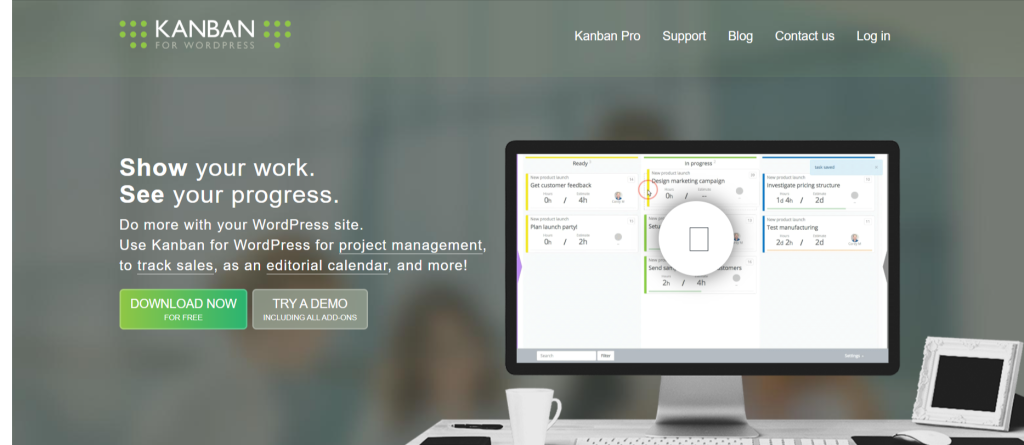
Kanban for WordPress incorporates a simple, Trello-style interface within your dashboard. It is suitable for users with a visual orientation who enjoy moving tasks through various stages. The plugin helps you organize and customize boards and cards to manage workflows, to-do lists, and various tasks. Kanban for WordPress helps you oversee and monitor your progress on a content calendar, a development sprint, or a product launch, and allows for quick adaptations.
Key Features:
- Visual drag-and-drop boards
- Custom statuses and task types
- User assignments and time estimates
- Private boards and permissions
- Simple setup and quick load times
| Pros | Cons |
| Easy, visual task management | Basic analytics and reporting |
| Great for agile teams | Limited communication tools |
| Lightweight and fast | Fewer integrations than SaaS tools |
Best for: Agile teams, developers, startups, editorial teams
8 – Task Manager Pro

Task Manager Pro is a straightforward and efficient tool for managing daily operations within WordPress. It’s meant to be lightweight and easy to use, and it’s aligned with the needs of small teams and individuals to keep track of their workload. The plugin lets you create tasks, set deadlines, assigns priorities, and track progress, all within a few clicks. The absence of advanced automation is intentional simplicity for users who prefer to minimal setup.
Key Features:
- Task creation and categorization.
- Progress tracking.
- Due dates and reminders.
- Team assignments and roles.
- Simple dashboard interface.
| Pros | Cons |
| Simple and quick to set up | Lacks advanced features |
| Lightweight performance | No time tracking |
| Great for small operations | Not ideal for large projects |
Best for: Bloggers, small teams, freelancers.
9 – Monday.com Integration for WordPress

This plugin bridges your WordPress site with the powerful Monday.com platform, giving you the best of both worlds: the flexibility of WordPress and the automation strength of Monday.com. You can display, manage, and update Monday.com boards directly from your WordPress dashboard. This is particularly valuable for large organizations already using Monday.com for internal project management but wanting to share limited data or dashboards with clients or staff on WordPress.
Key Features:
- Supports sync of Monday.com boards and tasks
- Presents boards through shortcode or widget
- Live updates and automation
- Control of access visibility
| Pros | Cons |
| Full power of Monday.com inside WordPress | Requires external account |
| Great automation and integrations | Setup can be complex |
| Ideal for large teams | Monthly costs may add up |
Ideal for: Enterprises, agencies, marketing teams
10 – Trello Integration via WP-Trello

WP-Trello brings Trello’s intuitive card-based task management to your WordPress site. It provides card-based task management. Users can embed Trello boards into WordPress posts and pages, which provides updates on projects and keeps them interactive. For teams that use Trello, this is a great resource to incorporate progress tracking and enhance project visibility through a WordPress portal or client dashboard.
Key Features:
- Embed Trello boards and lists
- Sync and update cards automatically
- Shortcode and widget display options
- Public or private board visibility
| Pros | Cons |
| Integrates seamlessly with Trello | No editing inside WordPress |
| Keeps clients updated in real time | Depends on Trello’s platform |
| Simple and visual | Lacks standalone features |
Best for: Teams using Trello for project management
Expert Tip
Regularly audit your WordPress plugins to ensure they are all necessary for your site and remain updated and compatible with each other. For better performance and fewer maintenance and security concerns, use fewer, high-quality plugins, caching, and a CDN.

11 – WP ERP (Project Management Module)

WP ERP is a complete enterprise-level plugin suite that combines HR, CRM, and Project Management modules into one WordPress-based ecosystem. The project management module allows you to plan, assign, and track work across multiple teams. It integrates with your company’s HR data and customer relationships, offering a unified workflow for internal and external management. WP ERP is perfect for businesses that want to centralize all their operations without relying on multiple separate tools.
Key Features:
- Task and milestone supervision
- Team cooperation tools
- Customer relationship and human resource management integration
- Reports, notes, and document collaboration
- Customizable permissions and activity logs
| Pros | Cons |
| All-in-one business solution | Can feel complex for small teams |
| Integrates multiple departments | Learning curve required |
| Great scalability | May require premium extensions |
Ideal for: Medium to large size business, corporate teams
12 – Freedcamp Integration

Freedcamp Integration links your Freedcamp projects to your WordPress dashboard for useful and quick access to your live projects. Its collaboration and easy to use task modules are spot on. The integration permits you to embed project summaries or effortlessly export task lists to your WordPress pages. This is useful to agencies that want to showcase status on client projects or internal project progress to a WordPress site.
Key Features:
- Integrates Freedcamp projects with WordPress
- Shows tasks, milestones, and updates
- Secure API connection
- Custom shortcodes supported
| Pros | Cons |
| Keeps project data accessible | Requires Freedcamp account |
| Secure and reliable connection | Limited customization |
| Easy client updates | No offline access |
Best for: Remote teams, digital agencies, project-based businesses
13 – WP Client Portal

WP Client Portal works on client communication and transparency. It allows you to create secure and personalized portals for clients to log in to, view updates, download files, and track deliverables. This plugin is centered on client relations and project visibility, rather than internal task management, so it works great alongside other management tools. It’s perfect for freelancers and agencies to provide clients with a polished and professional interface.
Key Features:
- Exclusive client access
- Upload files and documents
- Progress tracking and deliverables dashboard
- Scheduled email reminders
- Personalized branding
| Pros | Cons |
| Elevates client communication | Limited internal task tools |
| Clean and professional interface | No built-in task automation |
| Secure and private | Add-ons can increase cost |
Most suitable for: Freelancers, consulting professionals, and creative agencies
Streamline Your Workflow with Hostonce
Enhanced project management is made possible by dependable website hosting. We, at Hostonce, integrate performance with scalability and exceptional WordPress support to keep your business orderly and efficient.
14 – Projectify

Projectify is a lightweight professional project management plugin that focuses on simplicity and speed. It provides essential functionalities like task lists, milestones, and client dashboards, all neatly packaged in a modern design. Unlike other, more complicated plugins, Projectify is straightforward to set up, making it ideal for smaller operations that don’t require advanced complexities. The design also provides a responsive interface that adapts to any device, ensuring that productivity is maintained.
Key Features:
- Creation of tasks and projects
- Management of clients and teams
- Tracking of milestones
- Contemporary and responsive design
- Options for sorting and filtering projects
| Pros | Cons |
| Minimal and elegant interface | Limited integration options |
| Easy for non-technical users | No built-in reporting |
| Lightweight performance | Not suitable for large-scale teams |
Ideal for: Freelancers, new businesses, design studios
15- Airtable Integration for WordPress

Airtable Integration for WordPress enables website integration with the Airtable flexible database. It is perfect for users who enjoy managing projects in a spreadsheet format. You can show Airtable data, keep track of tasks, or update records on your website. This is useful for teams managing large datasets, content pipelines, or editorial workflows. Every update on Airtable is reflected on WordPress in real-time, providing instantaneous access to the most current data.
Key Features:
- Airtable real-time sync
- Create customizable tables and forms
- Display project data via API
- WordPress page embedding of Airtable views
| Pros | Cons |
| Highly flexible and data-rich | Requires Airtable setup knowledge |
| Ideal for custom workflows | Dependent on Airtable’s API |
| Great for large data sets | Limited offline capability |
Best for: Developers, editorial teams, data-driven businesses
Conclusion
The right project management plugin can completely transform the way you organize, collaborate, and deliver work in WordPress. There are so many powerful options available that there is no one-size-fits-all solution; the best plugin is the one that most aligns with your workflow, team size, and goals.
Devote some time to experiment with various plugins, familiarize yourself with their capabilities, and assess their compatibility with your current systems. Since most plugins provide free versions or trials, you can conduct some risk-free investigations prior to a purchase.
In 2026, improving efficiency within workflows isn’t solely a matter of putting in more effort; rather, it is about optimizing strategies. Appropriate WordPress project management plugins will enable you to remain structured and enhance productivity while facilitating a more integrated and team-oriented collaboration.
Best WordPress Hosting for Small Businesses in 2026
By Javeria Riaz on October 12, 2025FAQ
Are project management plugins suitable for freelancers?
Absolutely. Freelancers can use lightweight plugins like Kanban for WordPress or Projectify to manage client work, deadlines, and communication in one place. It’s a great way to stay organized without relying on multiple third-party platforms.
Which project management plugin is best for agencies?
For digital agencies, WP Project Manager Pro, Projectopia, and WP ERP stand out. They offer client portals, invoicing, team collaboration, and reporting, ideal for managing multiple projects and clients efficiently.
Do I need coding knowledge to use these plugins?
No. Most modern project management plugins are designed for ease of use and come with intuitive, drag-and-drop interfaces. You can set up projects, assign tasks, and monitor progress without any coding skills.
Are there free project management plugins for WordPress?
Yes. Plugins like Zephyr Project Manager, UpStream, and Kanban for WordPress offer free versions with essential features. You can later upgrade to premium plans for advanced capabilities like time tracking, reporting, and integrations.

Hostonce is the #1 WordPress Host
Ranked by 930+ customers in G2's Best Software Awards.

