cPanel has gained popularity as an easy web hosting control panel. Customers feel relaxed using the control panel to manage their email accounts and websites. Strong password hygiene is recommended for the protection of your cPanel. But how to change cPanel password in the first place? We will cover that question in this article.
How Important is a Strong cPanel Password?
Before we cover the process of how to change cPanel password, it is crucial to understand the importance of the act. Here we go:
- Your cPanel account has vital data, including databases, site files, and email communications. A weak password is vulnerable to malicious attacks and unauthorized access.
- Hackers have a passion to target cPanel accounts. They want control over websites. A strong password is your initial defence against them.
- A compromised website results in profit and reputation loss.

Secure your cPanel today with Hostonce!
Do not wait for a cyber incident to happen—turn to Hostonce now and keep your website protected from unwanted access!
How to Change cPanel Password
There are two main ways to change your cPanel password:
Changing Password within cPanel
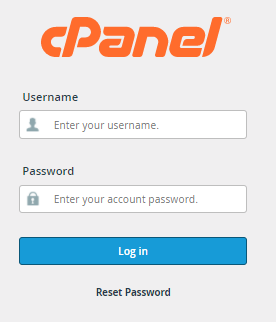
- Use your current password to access your cPanel account. Open your web browser and go to your cPanel URL. Your web hosting provider can give you this information. Use your username and password to enter.
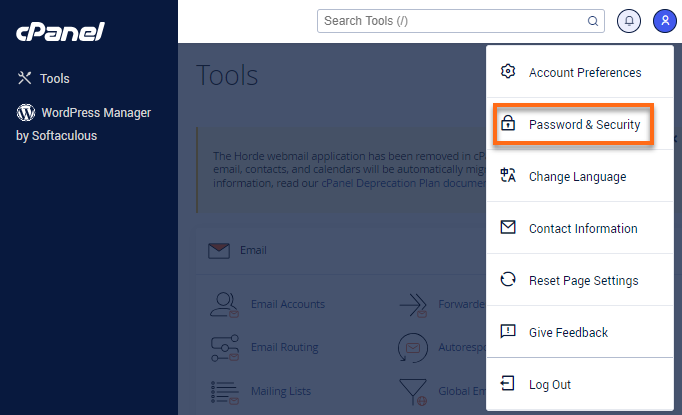
2. Now that you are in, find the “Password & Security” icon or link in the interface. Look for it under the “Preferences” section.
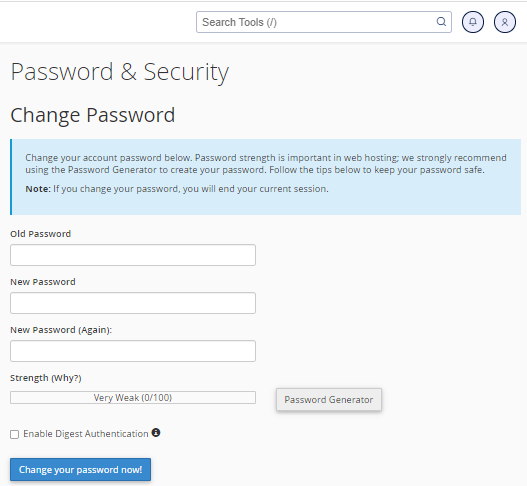
3. You will be required to enter your current password.
4. Now you will have to create a new password and re-enter it. You may have a password strength indicator to lead you to a secure password.
5. Click the “Save” or “Change Password” button to apply the changes.
Reset cPanel Password
- Navigate to your cPanel as stated above.
- Find the “Reset Password” button or link on the login page. Click it.
- You will have to enter your cPanel username.
- Give the email address linked to your cPanel account.
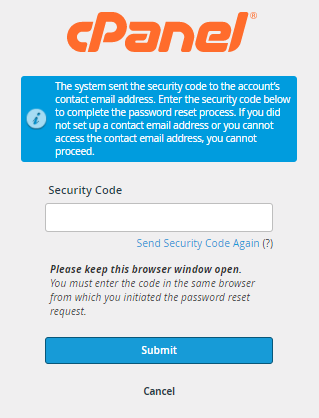
- A security code will be sent to your email address via your provider. Use that code in the required field.
6. Enter the new password and confirm it.
7. Click the “Set Password” to reset the cPanel password. You can log in to your cPanel with a new password this way.
How to Create Strong Passwords?
Understandably, you want to increase your cPanel security. But do you know how to create strong passwords? Follow these password creation guidelines:
- Your password should be at least 12 characters in length.
- Keep it a blend of uppercase and lowercase letters.
- Do not use guessable information such as common words, birthdays, and pet names.
- Use a reliable password manager to generate or store complex passwords securely.
- Enable 2FA as an extra layer of protection.
Hostonce Tip: Stay One Step Ahead with Strong cPanel
The reliable hosting service of Hostonce has a word of wisdom to offer!
Maintenance of strong password security for your cPanel account is a crucial step in web hosting protection. Many users have no precise idea about the damage a compromised password can result in. Hackers can manipulate databases or steal sensitive information.
It is not just about changing your cPanel password successfully once and then forgetting it forever. Proactive security should be your habit. Enable two-factor authentication and review your account access alongside a strong password to minimize risks across all platforms.
You could alternatively integrate cPanel’s Password & Security tool through your hosting provider’s monitoring system. It can alert you to password strength issues or unauthorized login attempts. Combine these acts with a strong password, and your credentials are well-secured. At least you do not have to worry about weak unauthorized attempts.
Your cPanel is the backbone of your website operations. Vibrant password hygiene is a long-term investment to keep your digital space safe and allow yourself some peace of mind.
Points to Ponder
These are some key points you should not forget for your own good.
- Update your cPanel password from time to time to reduce the risk of unauthorized access.
- Be conscious of messages or emails asking for your cPanel password.
- Ensure your website plugins and software are updated with the newest security patches.
- Secure your computer with antivirus software and a firewall to stop malware infections that could expose or compromise your cPanel credentials.
Get more helpful knowledge from Hostonce here!
Conclusion
Change cPanel password to keep your website files and database secure. It is not a difficult task, and it may not seem important, but it has an impact far bigger than you might imagine. There is no bliss bigger than a secure website. We wish you the best of luck in your endeavour!
Frequently Asked Questions
Why should I update my cPanel password regularly?
Regular password updates reduce the risk of unauthorized access. This is how it protects your website files, emails, and databases from hacking attempts and data theft.
What is the ideal strength for a cPanel password?
A strong cPanel password should include at least 12 characters, mixing uppercase, lowercase, numbers, and special symbols. Avoid predictable details like birthdays or names.
Can I use a password manager for my cPanel credentials?
Yes. Using a trusted password manager is recommended to store and generate complex passwords. It ensures you never forget or reuse weak passwords.
Does cPanel support two-factor authentication (2FA)?
Absolutely. cPanel supports 2FA. It adds an extra layer of security as it requires a verification code in addition to your password during login.
