Hostonce is a relatively new entry on the stage, but it has been gaining popularity among WordPress users. The reason? We offer affordable WordPress hosting compared to many other platforms on the market. We realize that we must enlighten you on how to change Hostonce nameservers so that you can experience a reliable hosting service.
Table of contents
Two Options for Hostonce Custom Nameservers
You will have two options when you point your domain to Hostonce. The first option is to use an A record. The second option is to use Hostonce’s superb DNS feature with Amazon Route 53. It is the second option that needs you to change your nameservers. Use the instructions given below to point the nameservers to us or change them altogether.
Changing Other Nameservers to Point to Hostonce
While the procedure of changing a name server is not hectic, it requires accuracy. This is why you should pay attention to the following steps:
- Log in to the account dashboard of your domain.
- Select the domain you want to point to Hostonce and click on “Manage.”
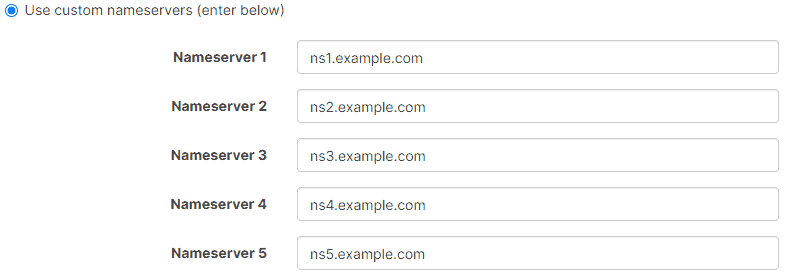
- The nameservers on your domain will be set to BasicDNS; you will have to change them afterwards. Select “Custom DNS” from the “Domain” tab; you can find it in the dropdown of the nameserver section. You may skip to the next step for the update if you have custom nameservers from a previous host already.
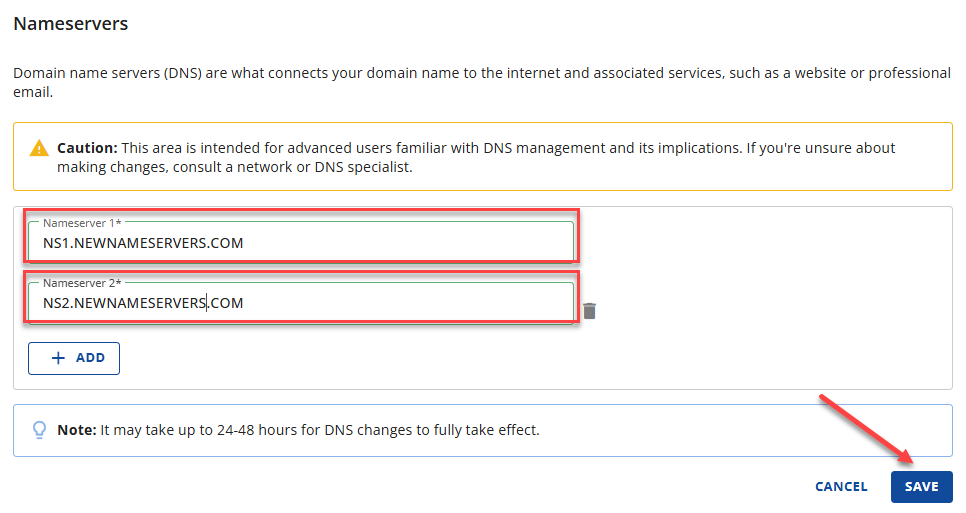
- Add the nameservers that we provide you. You can locate those when you click into Hostonce DNS. That is the section you can find on the dashboard. When the process is finished, you may click the green check mark.

“Nameservers for your rescue!”
Let nameservers reshape how you view your online platform—switch to Hostonce nameservers for a spectacular experience!
It could take up to a few minutes for the nameservers to be applied everywhere. Free tools such as What’s My DNS can be used to check if your nameservers are pointed correctly. Make sure that you are done adding your DNS records in the Hostonce dashboard for your WordPress website to run well.
You can strengthen your website with Hostonce’s Managed WordPress hosting; it is designed for simplicity, security, and speed. Hostonce gets you:
- Easy control in the Hostonce dashboard.
- Limitless free migrations, which our expert migration team handles well.
- Always available support from our WordPress experts.
- The premium infrastructure from Google Cloud.
- High-level security through Cloudflare integration.
- 37 data centres making the global reach possible.
Name server changing can be a useful addition for your domain.
Understanding the Importance of Nameservers
Did you know that your domain comes with a default nameserver? That nameserver is your registrar’s. These nameservers are the home address of your website. They tell the Internet where your website can be found.
When you move your site to a new hosting service, say Hostonce, then you should update those nameservers so that visitors are aware of the new home of your website. Much like how you inform others when you move to a new place, if you do not inform them, well… That is kinda sus. Anyways…
If you think Hostonce is just one of those usual WordPress hosting providers, it is time to rethink. Simplicity is what Hostonce is most conscious about. We do not want you to juggle server configuration and multiple dashboards as you chase quality management; we make sure that everything is streamlined in a single panel. And here is the real pleasant surprise: 37 data centres across the world can help you unlock global reach, which guarantees quick loading of your website regardless of where visitors access it from.
What is more? Cloudflare protection is established to enhance your security. It shields your website from malicious traffic and other data breaches. Then there is premium infrastructure that Google Cloud empowers for ultra-fast speed and strong uptime. Most users in such a situation would prefer not to rely on an A record and would rather switch to Hostonce’s nameservers.
Key Information Before You Update Hostonce Nameservers
Another point to ponder over is that you must not be hasty with the switch. First of all, make sure that your Hostonce DNS panel has important DNS records like CNAME, MX, and A records. Forgetting or skipping this step can result in the temporary loss of your email or website. If you are having a hard time, do remember that Hostonce’s knowledge base team is active enough to inform you about the process (or even do it if you say so). That is one of the highest benefits of choosing our managed WordPress hosting.
Your adventurous journey through Hostonce’s hosting benefits will begin once your nameservers are set. These benefits include limitless migrations so you keep essential data, troubleshoot issues anytime, and a security-first method that is gigantic against attempted hacks.
Long story short: changing nameservers leads to a faster and safer website. Hostonce makes sure the transition is smooth; small role but a big impact. Count on Hostonce and you will not regret it at all.
Summary
Do not feel let down when you have to change nameservers. Hostonce has made the process quite beginner-friendly and straightforward for anyone. You can change Hostonce nameservers without much of a hassle. This is what makes the management of your WordPress website faster and easier. Give switching a thought, as it is beneficial and takes you to a seamless hosting experience.
Frequently Asked Questions
Should name servers be changed before I use Hostonce?
That is not always the case. You may use an A record to point your domain. That said, it is recommended to use Hostonce’s nameservers for finer DNS management.
Where are Hostonce nameservers located?
Go to the DNS section and then Hostonce’s dashboard. You can find Hostonce nameservers there.
Can changing nameservers affect websites?
It definitely can if not handled with care. Do not switch unless you are sure that all crucial DNS records are added in your Hostonce dashboard.
Is it possible to switch back to the old nameservers?
Switching back to the old nameservers is possible for sure.
