Excited to take full control of your website files? Anyone would be. You might have little notion of how excellent FTP can be for your website. Do not worry: we will help you learn. Use this guide from Hostonce to create FTP account cPanel and secure file access in minutes.
Table of Contents
Hide ▲Key Takeaways
- Setting up cPanel FTP can do wonders
- FTP Account in cPanel helps well
- Monitoring FTP Activity is good for security and performance
cPanel FTP account setup: Simple and Efficient
Let us waste no time in imparting and seeking knowledge. Here you go:
1. Log in to the cPanel account.
2. Go to the Files section. Search for the “FTP Accounts” option. Click on it.
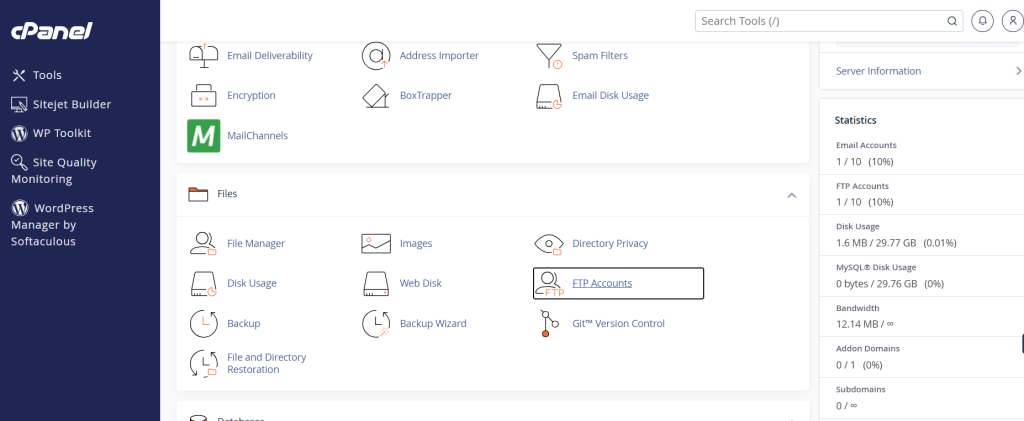
3. Fill out the required information under “Add FTP Account”:
- Login: Set a username for the FTP account.
- Password: Create a secure password for the FTP account.
- Directory: Give the path to the directory to which the FTP account will have access. This is the public_html folder for the central website.
- Set the Quota to limit the storage of disk space that the FTP account can consume.
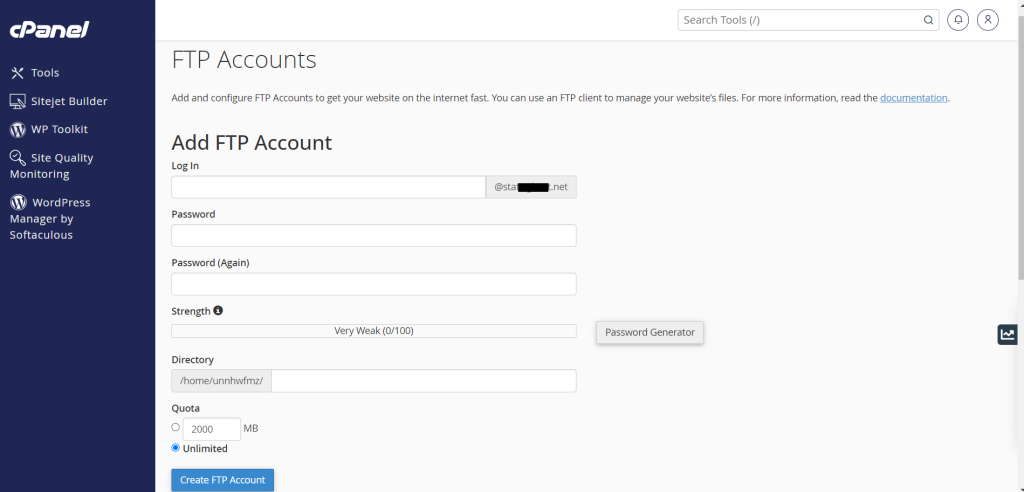
Click the “Create FTP button” for process completion. Congrats on the success!
You can enter the right credentials and use FTP for your server connection and file management.
The Significance of FTP Account in cPanel
Have you created the FTP account in cPanel? Good. The next crucial step is understanding how to maintain, use, and secure it. Beginners create the account without any issue. This is how they end up in a deadlock and have no idea what to do next.
FTP is a strong tool. The right knowledge of this tool can help you achieve wonders. Let us capitalize on how useful FTP can be.
Understanding the FTP Purpose
File Transfer Protocol is a process of transferring files between your computer and your hosting server. Website development, backups, and maintenance are domains where it is used the most.
An FTP account allows you direct access to site folders without having to log in all the time. This is indeed useful when you work on your website. It is considered beneficial when you want to upload large files or want others to access specific folders.

Ready to manage your website files like a pro?
Get fast and secure hosting with expert support at Hostonce! Start your hosting journey today and enjoy seamless FTP access with every plan!
Where is the FTP Account in cPanel?
This question is unsurprisingly common. Once you are done with the FTP account creation, go to the “FTP Accounts” table. The table shows all users with their quota settings and assigned directories. You can:
- Change directory access.
- Change passwords.
- Configure FTP client settings.
- Remove any FTP account.
- View quota and usage information.
This section is practically your control centre for the management of all FTP-related activities.
Many beginners often ask why use FTP if File Manager is already present in FTP. Big differences are:
| File Manager | FTP |
| Best for small edits | Best for big tasks |
| Limited upload size | No upload limit |
| Good for quick file viewing | Good for large migrations |
| Manual interface | Drag-and-drop interface |
| Runs inside cPanel | Runs outside cPanel |
Management of FTP Permissions and Access Control
Managing FTP permissions is integral to the effective use of FTP accounts in cPanel. Assigning a directory to any FTP user allows them certain control over the internal structure of your website. That makes it crucial to grasp how permissions operate with hosting environments.
Let us make it clear with an example. Suppose you assign an FTP user a subdirectory. They cannot exceed that level or have access to parent folders. You never gave them that kind of control. This controlled environment reduces accidental changes as each user only gets to work within their assigned areas. It limits the possibility of file manipulation or unauthorized access.
This act also helps us realize the importance of accurate directory organization. Even the websites with heavy content, like stores or membership platforms, benefit well from a planned directory structure. And why not? It simplifies maintenance after all.
Monitoring FTP Activity for Performance and Security
Monitoring FTP activity is considered a smart practice to keep your website protected. cPanel has logs that display file transfer activity and login attempts. This feature is often overlooked due to a lack of awareness, yet it comes in handy when someone attempts to access your FTP account without permission. Reviewing these logs on a daily basis can alert you to suspicious activity.
Security benefits are one thing. FTP logs are super useful for tracking performance issues as well. You can use the logs to diagnose errors because of overwritten files and updated themes. Monitoring activity is a good measure of keeping your FTP accounts protected and running well.
Visit our knowledge base for essential knowledge on such topics.
Conclusion
To create FTP account cPanel is not a stressful gig. The significance of FTP is that it provides an efficient workflow that exceeds the capacity of a File Manager. A proper understanding can help you maintain a safe and organised hosting environment. FTP becomes an essential tool for website performance and development or solid maintenance. Reliable hosting provider like Hostonce can help you score stability and support you long for.
Frequently Asked Questions
What information do I need to connect to FTP?
You need the FTP hostname (your domain or server IP) to connect to your server through FTP. Enter essential details in an FTP client like FileZilla or WinSCP to establish the connection.
What folder should I assign to my FTP account?
It depends on how much access the user needs. Select public_html for full website access. Assign a subfolder like public_html/project for restricted access so they can work only within that directory.
Why is FTP quota important?
The FTP quota limits the amount of disk space an FTP user can use. This helps prevent the server from bearing the load of large or unnecessary uploads. Proper quota keeps storage under control and your website continues to perform well.
Is FTP safe to use for website files?
FTP is safe when used with strong passwords and limited directory access. Many hosting providers offer SFTP for connection encryption. Always remove unused FTP accounts to maintain optimal security.
