Beginners often overlook the benefits of subdomains. They mistake it as another extra they could be well off without. This is a huge misconception. Subdomains are known for smoother management given their ability to keep things in flow. Let us help you create subdomain cPanel so that you can save your time looking into a random cPanel subdomain tutorial.
Table of contents
Key Takeaways
- Subdomain Creation in cPanel is great for management
- Subdomains make your web management easy
- Subdomain Testing is crucial before you rejoice
Easy Steps to Create a Subdomain in cPanel
Did you know that you can create unlimited subdomains on most hosting plans? Your domain is just the tip of that mighty iceberg. But how to achieve this wonder? Use these vital steps to create a subdomain in cPanel:
1. Log in to the cPanel account.
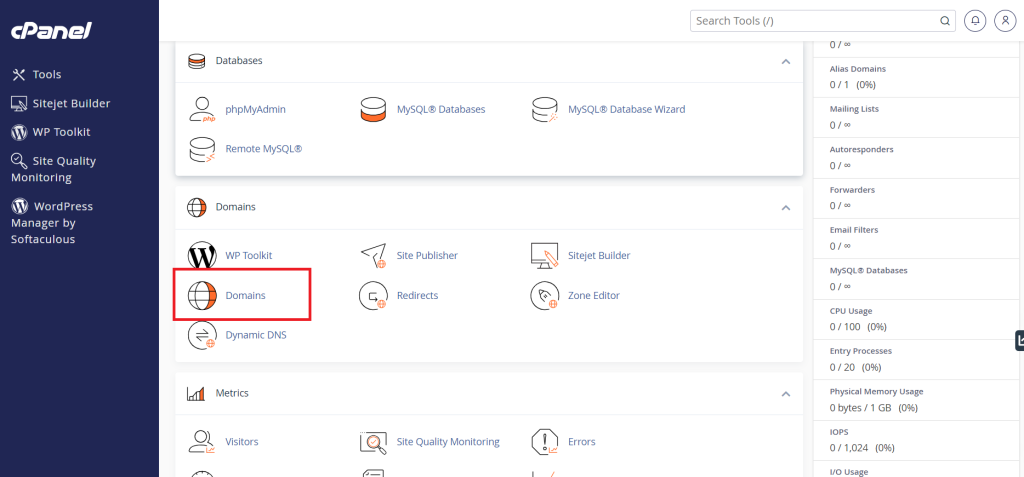
2. Look for the “Domains” option in the “Domains” section. Click on it.
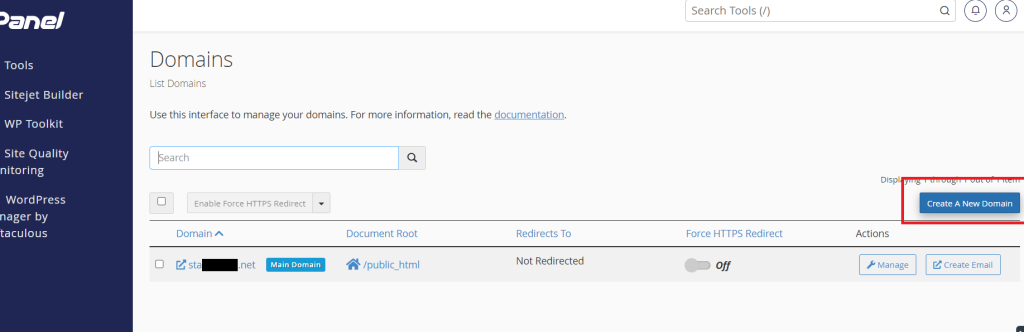
3. You are on the Domains page now. Click the “Create A New Domain” button.
4. Go to “Create a New Domain.” Enter the subdomain you want in the “Domain” field.
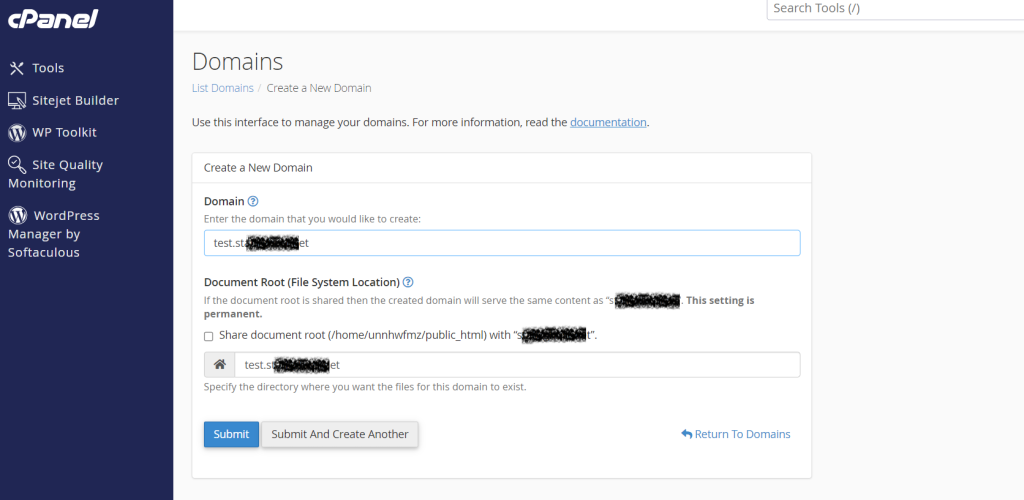
5. cPanel fills in the “Document Root” automatically based on the subdomain you give.
It is optional to change the “Document Root” to set a custom directory for that subdomain. Click on the “Subdomain” button.
Now you have created a subdomain in cPanel successfully.

Ready to manage your website the smart way?
Switch to Hostonce and create unlimited subdomains with blazing-fast and reliable hosting! Join hands with Hostonce now and make your life a little easier!
Are Subdomains Useful for Website Management?
Small wonder that subdomains are widely used. Common purposes can persuade anyone to opt for subdomains. These purposes are:
1. Organized Website Sections
It is a good idea to separate your personal blog from your main business site. Add blog.yoursite.com to keep things clean.
2. Using Various Applications
Keep WordPress on the main site. Magento or OpenCart on a store subdomain. Laravel on a custom development subdomain.
3. Developing Staging Environments
Developers build staging.yoursite.com for update testing before making them live.
4. Hosting Internal Tools or Client Areas
Companies make private portals like crm.example.com or portal.example.com for this purpose.
5. SEO Benefits
Subdirectories generate SEO value better. Subdomains are simply ideal when your content is different enough to earn separation.
Things That Follow the Creation of a Subdomain
The subdomain is active within your hosting account the moment you click the button to finalize creation. DNS might need a few minutes to update. Depends on your hosting provider.
This is what goes next:
1. A New Folder for the Subdomain
A new folder is created for the subdomain. This is where you upload files. Either that or install a CMS like WordPress and Joomla or any other script.
2. Ready for Software Installation
Does your hosting include Softaculous or a similar installer? Then you can install apps with a single click on the subdomain.
3. Set up Redirects
Some users create subdomains just for the sake of redirection to another page.
4. Applied SSL
Most cPanel servers add AutoSSL. It generates SSL certificates for subdomains. You can request one manually if it does not.
5. Like a Full Site Management
The subdomain will show up in your domain list, DNS zone, and file manager.
Potential Mistakes When Creating Subdomains
These are some common mistakes people make to help you avoid issues.
1. Wrong Spelling
Be conscious of creating a subdomain with the right spelling. Even a single wrong character means a new URL and a new folder that will not match your intention.
2. Incorrect Document Root
Files may not load well if you accidentally change the Document Root.
3. Missing DNS Propagation Time
The new subdomain will not open right off. Waiting half an hour solves this.
4. CMS Files in the Wrong Folder
Your installation must target the subdomain directory instead of the main website.
5. Mixing www with Subdomains
We do not use “www” with subdomains. For example, www.blog.example.com is not correct. Blog.example.com is correct.
How to Test Your New Subdomain?
You should check whether the subdomain is working or not.
- Access the URL in your browser.
- You should either see the default “Success” page of your hosting provider or a blank directory page.
- You will see your content displayed in case you upload an index file.
If a 404 error or similar shows up, then it hints at DNS updating. Or it could mean that the Document Root might be incorrect.
Why should you test your new subdomain? You should keep in mind that a subdomain eases website growth. It allows expansion without disrupting your main website. The more your project grows, the more subdomains you can create for content, services, and tools.
Protip: Great hosting plans can ease your website management.
Conclusion
To create subdomain cPanel is a smart way to organize and simplify your website management. Subdomains give you structure without interfering with your main site. They help you scale and manage content well. A trusted hosting provider like Hostonce gets you flexibility to create unlimited subdomains and enjoy secure performance every step of the way. Subdomains let you expand confidently as your website grows. They are not your enemy; try them.
Frequently Asked Questions
What is a subdomain used for?
A subdomain helps separate certain sections of your website like blogs and stores without affecting your main domain.
Do subdomains cost extra?
No. Most hosting providers such as Hostonce allow you to create unlimited subdomains at no additional cost as long as you stay within your hosting plan limits.
How long does a new subdomain take to work?
A subdomain is active instantly in cPanel. DNS propagation may take anywhere from a few minutes to 30 minutes depending on your hosting provider.
Can I install WordPress on a subdomain?
Yes. You can install WordPress or any CMS on your subdomain using Softaculous or manual upload. Just select the subdomain folder as the installation directory.
