Encountering an error message like Error code 1020: Access Denied can be blocking, especially when you are trying to access a website for important information or services. This error is commonly associated with Cloudflare, a popular web infrastructure and security company that provides content delivery network (CDN) services and DDoS protection. When Cloudflare detects suspicious activity or a violation of firewall rules, it may block access to a website, resulting in Error 1020.
This article provides a comprehensive breakdown of what the access denied Error code: 1020 means, why it occurs, and how to fix it, whether you are a site visitor or a site owner.
What Is Error 1020: Access Denied
Error code 1020 website is a Cloudflare-specific HTTP error that occurs when a user’s request violates a firewall rule set by the website owner. In simpler terms, Cloudflare is denying access to the site because it believes the request is potentially harmful or unauthorized.
Error 1020: Access Denied
What happened?
This website is using a security service to protect itself from online attacks.
Why Does Error 1020 Occur
There are several reasons why Cloudflare might block access:
- Your IP may be flagged due to suspicious activity or being part of a known spam range.
- Some websites block traffic from specific countries or regions due to legal or security concerns.
- Disabled cookies, outdated cache, or conflicting extensions can trigger the error.
- Using a VPN or proxy server may mask your IP and trigger Cloudflare’s firewall.
- Site owners may have incorrectly set firewall rules that block legitimate users.

Try Hostonce’s Dedicated Servers for Ultimate Performance!
HostOnce gives you full control, powerful hardware, strong uptime, and top-level security. It’s a great choice for high-traffic websites and demanding applications.
Fixes for Site Visitors
If you are a regular user trying to access a website and encounter Error 1020, here are several steps you can take:
Cloudflare often requires cookies to verify user authenticity. Make sure cookies are enabled in your browser settings.
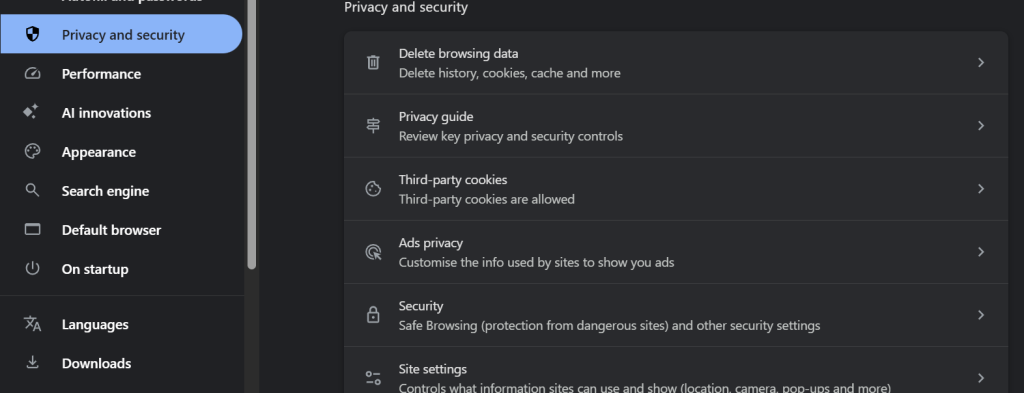
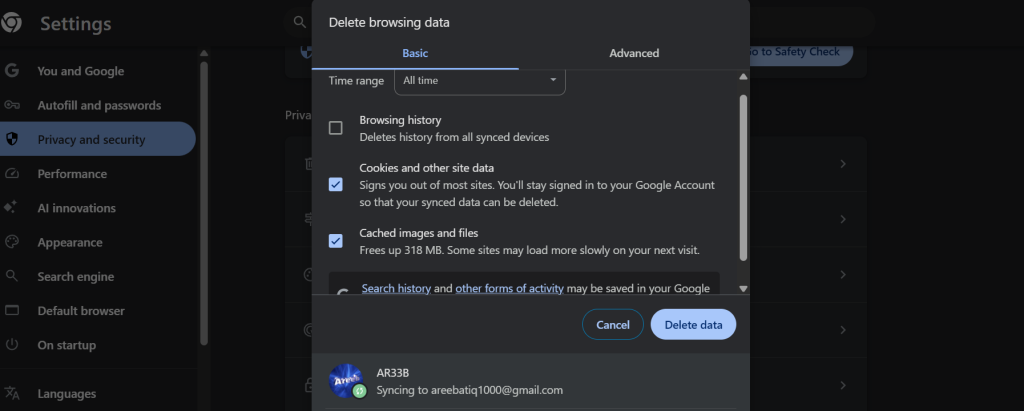
Corrupted cache or outdated cookies can interfere with site access. Go to browser settings. Choose “Clear browsing data”. Select “Cookies and other site data” and “Cached images and files”. Click “Clear data”.
Disable Browser Extensions
Some extensions, especially ad blockers or privacy tools, can interfere with Cloudflare’s verification process.
Try Different Browser
Sometimes, the issue is browser-specific. Switching to another browser (e.g., from Chrome to Firefox) can bypass the error.
Restart Router and PC
A simple restart can refresh your IP address and clear temporary network issues.
Turn off your router. Wait 30 seconds. Turn it back on and restart your PC.
Disable VPN Proxy
Cloudflare may block VPN or proxy traffic. Try accessing the site without these services.
Incognito Mode
Incognito mode disables extensions and uses a clean session, which can help bypass the error.
Change IP Address
If your IP is flagged, switching networks, for example, using mobile data, can help.
Fixes for Site Owners
If you are the administrator of a website protected by Cloudflare and users are reporting Error 1020, here’s how to resolve it:
Review Firewall Rules
Log in to your Cloudflare dashboard and check the Firewall Events Log. Go to Firewall, then Events. Look for blocked requests and identify the rule causing the block. Modify or remove the rule if it’s too restrictive.
Check Geo-Blocking Settings
If you have enabled region-based restrictions, ensure they are not blocking legitimate traffic.
Whitelist Trusted IPs
Add trusted IP addresses to your allowlist to prevent them from being blocked. Go to Firewall, then Tools. Add IPs under “IP Access Rules”.
Different Browsers
Try accessing your site from various browsers and devices to replicate the issue. Ensure your Cloudflare settings are up to date and compatible with your site’s configuration. Cloudflare offers pre-configured firewall rules.
Conclusion
Error 1020: Access Denied is a security measure, not a bug. It protects websites from malicious traffic but can sometimes block legitimate users. Whether you are a visitor or a site owner, understanding the root cause and applying the right fix can restore access quickly.
FAQ
What is Error 1020: Access Denied?
It’s a Cloudflare security error that blocks access due to rule violations.
Why am I getting Error 1020?
It happens when your IP or request violates site firewall rules.
How do I fix Error 1020 on my device?
Clear browser cache, disable VPN, or contact the site admin.
Can a VPN cause Error 1020?
Yes, VPN IPs may be blocked by a site’s security settings.
Does Error 1020 mean my device is blocked?
Not always it could be your IP or request pattern triggering the block.