
HTTPS is essential; with HTTPS enabled, your site may still be vulnerable if it lacks HTTP Strict Transport Security (HSTS). One common warning from security scanners or browser audits is: “HSTS Missing From HTTPS Server.” This error signals a critical gap in your HTTPS implementation that could expose users to downgrade attacks, session hijacking, and SSL stripping.
Let’s discuss what missing hsts header error means, why it matters, and how to fix it in five methodical steps.
What Is HSTS and Why Is It Important
HSTS (HTTP Strict Transport Security) is a security policy mechanism that instructs browsers to only interact with your site over HTTPS, even if the user types in http:// or follows an insecure link.
If HSTS header missing, your site is vulnerable to:
- SSL stripping attacks: Hackers intercept HTTP requests and downgrade them from HTTPS.
- Man-in-the-middle (MITM) attacks: Attackers can alter traffic between the browser and server.
- Session hijacking: Cookies sent over HTTP can be stolen and reused.
- Phishing via clone sites: Redirects can be intercepted and rerouted to fake versions of your site.
Even if your SSL certificate is valid, missing the HSTS header means browsers won’t enforce HTTPS-only access. That’s why this error is flagged by tools like Mozilla Observatory, Qualys SSL Labs, and SecurityHeaders.

Register Your Hostonce Domain in Minutes
Our quick and beginner-friendly guide helps you secure your perfect domain name without any hassle. Get started and launch your online presence today!
Step 1: Verify HSTS Header Is Missing
Before making changes, confirm whether your server is sending the Strict-Transport-Security header.
Use browser developer tools (Network tab) and inspect the response headers. Run a scan with SecurityHeaders or SSL Labs. Use curl:
curl -I https://yourdomain.com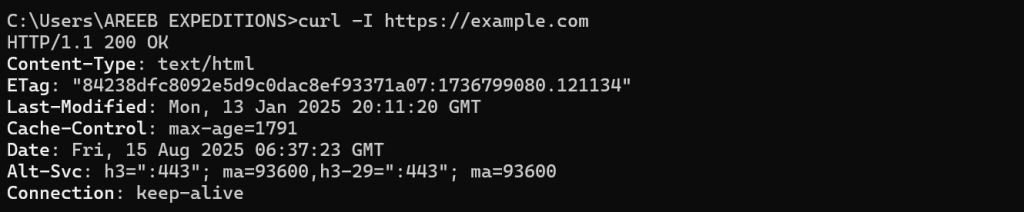
Look for:
Strict-Transport-Security: max-age=31536000; includeSubDomains; preloadIf this header is missing, you’re not enforcing HSTS.
Step 2: Set Up HTTPS Redirects
HSTS only works over HTTPS, so ensure all HTTP traffic is redirected to HTTPS.
For Nginx
server {
    listen 80;
    server_name yourdomain.com www.yourdomain.com;
    return 301 https://yourdomain.com$request_uri;
}
For Apache
<VirtualHost *:80>
    ServerName yourdomain.com
    Redirect permanent / https://yourdomain.com/
</VirtualHost>
This ensures that any insecure request is immediately upgraded to HTTPS before HSTS takes effect.
Step 3: Add HSTS Header to Your HTTPS Server
Now, configure your web server to send the Strict-Transport-Security header.
For Nginx
add_header Strict-Transport-Security "max-age=31536000; includeSubDomains; preload" always;For Apache
Header always set Strict-Transport-Security "max-age=31536000; includeSubDomains; preload"For WordPress (via .htaccess)
<IfModule mod_headers.c>
    Header always set Strict-Transport-Security "max-age=31536000; includeSubDomains; preload" </IfModule>
Header Breakdown
max-age=31536000: Enforce HTTPS for one year.includeSubDomains: Apply to all subdomains.preload: Opt-in to browser preload lists (see next step).
Step 4: Submit Site to HSTS Preload List
Major browsers like Chrome, Firefox, and Edge maintain a preload list, a hardcoded list of domains that must always use HTTPS.
Requirements
Serve HSTS header with:
Strict-Transport-Security: max-age=31536000; includeSubDomains; preload- HTTPS must be enabled and redirect all HTTP traffic.
- Must not serve HTTP on port 80.
- Must have a valid certificate for the root domain and all subdomains.
Submit your domain
Visit the HSTS preload website and follow the instructions. Once accepted, your domain will be baked into browsers, making it safer to defend against attacks even on the first visit.
Step 5: Monitor Configuration
After implementation, test thoroughly to ensure the header is being sent correctly and that redirects are functioning. You can in Chrome Browser DevTools, then Network tab, then Response headers section. The output would be like:
HTTP/2 200
Strict-Transport-Security: max-age=31536000; includeSubDomains; preload
Conclusion
Fixing the “HSTS Missing From HTTPS Server” error is not just about removing a warning, it is about countering your site against real world threats. By following these five steps, you will make sure that your visitors are always protected by HTTPS, even if they try to access your site via an insecure link.
FAQ
What does “HSTS Missing From HTTPS Server” mean?
It means your server is not enforcing strict HTTPS connections, leaving it vulnerable to attacks.
Why is HSTS important for HTTPS?
HSTS forces browsers to connect only via HTTPS, improving security and preventing downgrade attacks.
How can I check if my server supports HSTS?
Use online SSL testing tools or browser developer tools to verify HSTS configuration.
Can I enable HSTS without affecting users?
Yes, start with a short max-age setting, then gradually increase it after confirming no issues.
Do all browsers support HSTS?
Most modern browsers support HSTS, but older ones may not fully implement it.