Netstat is a tool used for monitoring and inspecting network connections through terminals. Netstat allows you to view statistics such as interfaces, active connections, and routing of your network connections. This utility makes it easy for you to identify and troubleshoot network issues on your Debian 12 system. We will discuss here how you can install Netstat Debian 12.
Table of contents
How to Set Up Netstat from ATP Package Manager on Debian 12
ATP package manager is quite a simple tool for the installation of Netstat on your Debian 12 system.
Step 1: Use APT to Install Netstat
Netstat is an integral package within net-tools, which contains multiple networking tools. Do you want to utilize the netstat? Type “sudo apt install net-tools” in the command line to install the net-tools.
The output will show that the net-tools and their connected dependencies are now installed on your Debian 12 system.
Step 2: Check Netstat’s Version
The version number of Netstat can be verified after installation. Just type “ netstat -V
“ in the command line, and you will learn what the current version of net-tools on your Debian 12 is.
Configuration of Netstat from the Source File (.deb) on Debian 12
You can use the source file (.deb) to install Netstat on your Debian 12 system.
Step 1: Download the Netstat Source File in “.deb”
You should download the source file in .deb format before you start the installation of Netstat. Type the “wget” command and add the Netstat download link to get the Debian file to your directory, such as “~/Downloads”
It will look something like: “wget http://ftp.de.debian.org/debian/pool/main/n/net-tools/net-tools_2.10-0.1_amd64.deb”
Wait until the download reaches 100%. The file will be present in the “~/Downloads” folder.

Improve Your Debian Management!
Turn to Hostonce support team if you need further help on how to install Netstat on Debian 12 — boost your network management with our help!
Step 2: Use “sudo” to install Netstat
Use the “sudo” package installer for unpacking and installing the .deb files. Type “$ sudo apt install net-tools -y” in the command line.
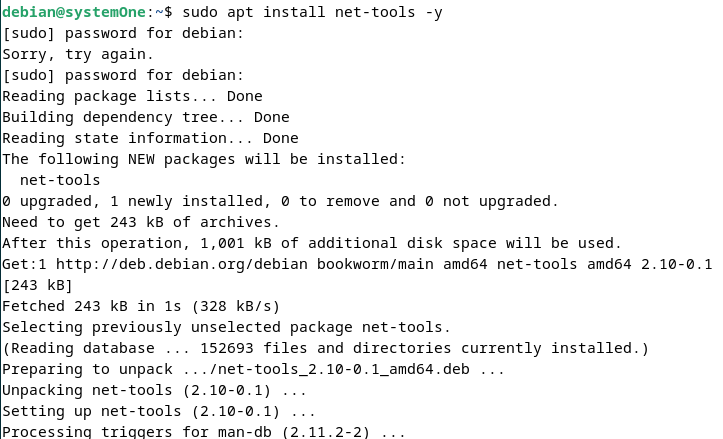
This command successfully installs the files and directories for the net-tools on your Debian 12 system.
You can use “netstat -V” in your command line to check if Netstat is now available or not.
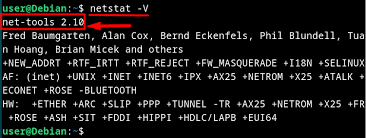
If the shown version number is something like “net-tools 2.10” on your Debian terminal, it shows that you have successfully configured the Netstat.
A relevant piece of info: do check out VPS hosting powered by HostOnce, for better network management.
How to Use Netstat on the Debian 12 System?
The following are two examples of how to use Netstat on your Debian 12 terminal:
Example 1: Monitor Interface Table
Add the “i” option next to netstat to display the network interface statistics. Use the command “netstat -i” to analyze the network interface on your terminal screen.
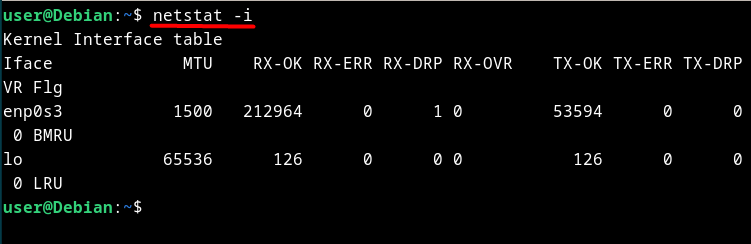
Example 2: Inspect Active Network Connections
Use the “a” option with the command “netstat -a” to inspect network connections on your Debian 12.
Importance of Installing Netstat on Debian 12
Netstat on Debian 12 is a vital skill for anyone who manages a Linux-based system. Netstat means network statistics. It is part of the net-tools package: a collection of networking utilities used to diagnose and troubleshoot network issues. It does not matter whether you are an end user or a system administrator; Netstat helps you view details about network interfaces and active connections.
This is how Netstat makes it easy for you to understand the system’s communications with other services and devices. Once you have installed it, be ready for powerful diagnostic commands.
The command “netstat -i” is used to display interface statistics, which helps you monitor traffic and identify issues such as packet loss. The “netstat -a” command enlists active connections, which are useful for detecting unauthorized or suspicious network activity.
Netstat is now a widely trusted tool for network and system administrators despite new utilities in Linux environments. It has simple, reliable, and detailed reporting to monitor network health. Netstat offers valuable insights on Debian 12 into all aspects of system connectivity.
Benefits of Using Netstat on Debian 12
Netstat handles multiple tasks, such as revealing the process that establishes connections or tracking which ports are open. This information is vital to managing server loads, ensuring smooth communication, and identifying potential vulnerabilities.
Another notable advantage of Netstat is its ability to detect malicious or unwanted activities. It observes unusual network behaviour like unknown connections or unexpected open ports. It helps users to take early preventive action against malware or intrusions.
Netstat is not just bound to troubleshooting. It is often included in system reports or automated monitoring scripts. This is how it serves as a broader network management strategy. Performance optimization or security auditing, its detailed result makes it a foundational tool for maintaining an efficient and healthy Debian 12 environment.
Conclusion
To install Netstat Debian 12 is not a difficult task. The Netstart belongs to the net-tool package. You can use different methods to install it. Usually, we use an APT package manager like “sudo apt install net-tools” or opt for the DPKG after downloading the source file in Debian format.
Do not forget to check into Hostonce for similar expert guides.
Frequently Asked Questions
How to use APT to install Debian 12?
Use the command “sudo apt install net-tools.” Netstart is part of the net-tools package, which is used to install multiple networking utilities.
How to confirm if Netstat is installed?
Go to the terminal. Type “netstat -V” in the terminal, and the installed version will be displayed.
How to install Netstat from a .deb source file?
Use “wget” to install the “.deb” file. Install it with “sudo dpkg -i net-tools_2.10-0.1_amd64.deb.”
What are the Netstat commands for Debian 12?
Use “netstat -a” to view network connections and “netstat -i” to monitor network interfaces.
