
Your users may want to know how to fix the NET::ERR_CERT_AUTHORITY_INVALID error, even if you have an SSL certificate installed on your site. The ‘invalid certificate authority’ error may sound scary in text, but it is not something to stress too much over.
Table of contents
We can guess by the name that the problem occurs when your browser cannot verify the validity of your site’s SSL certificate. You should not face this error if you are using HTTP or haven’t set up a certificate.
In the easiest terms: your browser does not recognize the certificate’s validity. It displays the error to keep you safe so that you can be alert about something going wrong. There are multiple ways you can fix the problem as the owner of your website.
There are three main causes for the invalid certificate authority error. Let us discuss each of them.
A Self-Signed SSL Certificate
A self-signed certificate is easy on the budget but your visitors can run into the error as browsers cannot verify it. Browser warnings can scare off a lot of users, so this is not the best approach for your website.
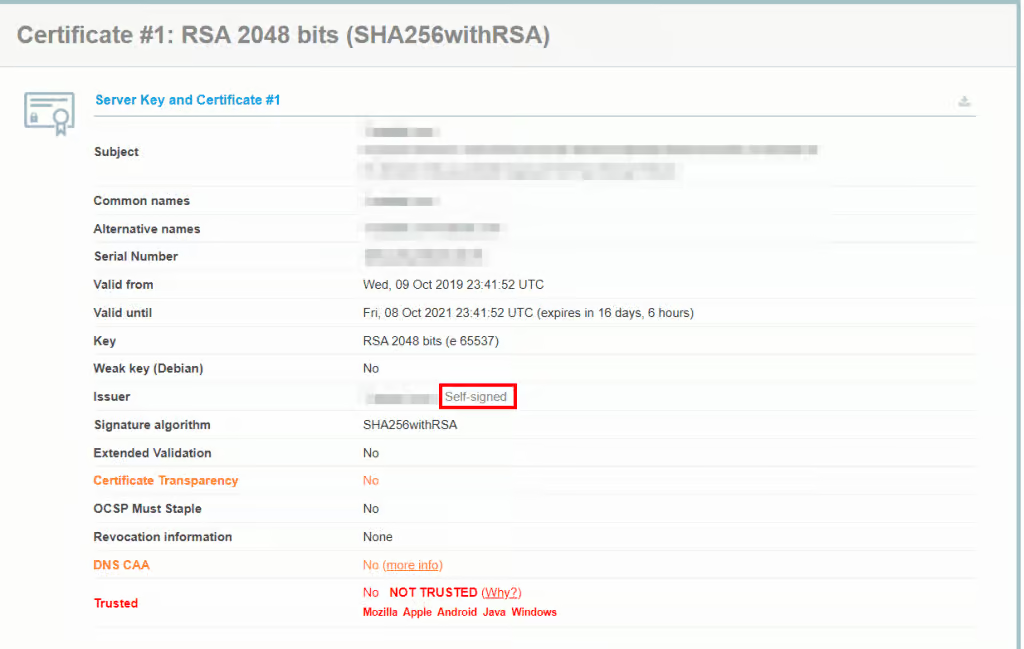
Expired Certificate
It is a security precaution when SSL certificates expire. It varies how long your certificate can last, but you will have to renew it or automate the process at some point (some web hosts and hosts can enable you to do this).
Non-Trusted Source
The certificate has a non-trusted source behind it, similar to self-signed certificates. You will see the error if the browser cannot verify the authority that issues the certificate.
Varying by the browser you use, there are some common variations.
- Your connection is not private
- Your connection isn’t private
- This Connection Is Not Private
- Warning: Potential Security Risk Ahead
Google Chrome
If you are using Google Chrome, the browser will immediately show you the error that your connection isn’t private. The browser cannot encrypt your data since it does not recognize the certificate’s validity. If you must proceed, you do so at your own risk. The error message reads:
“Attackers might be trying to steal your information from domain.com (for example, passwords, messages, or credit cards).”
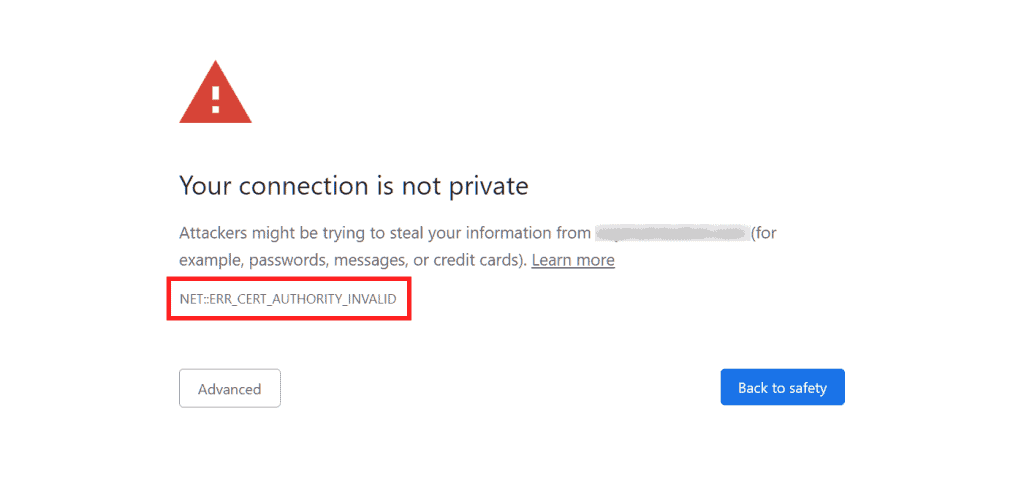
The following codes can show up in variations of this error on Chrome:
- NET::ERR_CERT_AUTHORITY_INVALID
- NET::ERR_CERT_COMMON_NAME_INVALID (This occurs when the certificate does not match the domain)
- NET::ERR_CERTIFICATE_TRANSPARENCY_REQUIRED
- NET::ERR_CERT_DATE_INVALID
- SSL CERTIFICATE ERROR
- NET::ERR_CERT_WEAK_SIGNATURE_ALGORITHM
Mozilla Firefox
Firefox wastes no time in warning that there is a potential security risk ahead. The browser issues the warning in a better way than Chrome when it comes to discussing the potential causes.
The main message looks like:
“Firefox detected an issue and did not continue to domain.com. The website is either misconfigured or your computer clock is set to the wrong time.
It’s likely the website’s certificate is expired, which prevents Firefox from connecting securely. If you visit this site, attackers could try to steal information like your passwords, emails, or credit card details.”
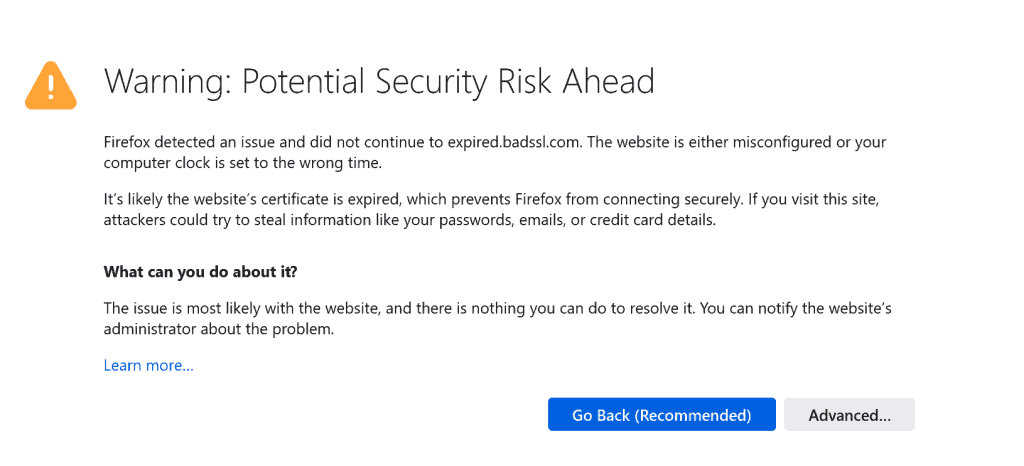
There are no specific codes for the variation error. You will see one of the following codes:
- SEC_ERROR_UNKNOWN_ISSUER
- MOZILLA_PKIX_ERROR_KEY_PINNING_FAILURE
- SEC_ERROR_REUSED_ISSUER_AND_SERIAL
- SSL_ERROR_RX_MALFORMED_HANDSHAKE
Just to let you know that Hostonce is around in case you want optimized CRM hosting solutions.

Need help with SSL issues?!
Save your visitors some trouble of SSL errors — regain trust and secure your website with Hostonce now!
Now you have the general idea of what the error looks like. About time we discussed how to fix the NET::ERR_CERT_AUTHORITY_INVALID error in nine methods.
Run an SSL server test
The easiest method to find out if your certificate is installed well is through an SSL check tool. Check out the one Qualys SSL Labs offers, which is free to use.
There is no reason why you should use self-assigned or other third-party certificates. If you are a Hostonce customer, you can have access to free SSL certificates through our Cloudflare integration.
Renew Your SSL Certificate
SSL certificates must be renewed often for security reasons. The renewal procedure verifies your domain identity, which is important to keep validation. You do not have to renew the free SSL security available to Hostonce customers through Cloudflare.
The Reload Technique
Feel free to troubleshoot directly from your device if the above solutions don’t work. Sometimes, the NET::ERR_CERT_AUTHORITY_INVALID error goes away when you reload the page. You can alternatively try to access the page in incognito mode.
Clearing the browser cache and cookies is easy, but the process is different for each browser. You can look up a few tips and get it done.
Another common solution is to force refresh your website so you do not have to clear the whole cache. Force refreshing does not always work so clearing the cache remains the first choice.
Sync the Clock
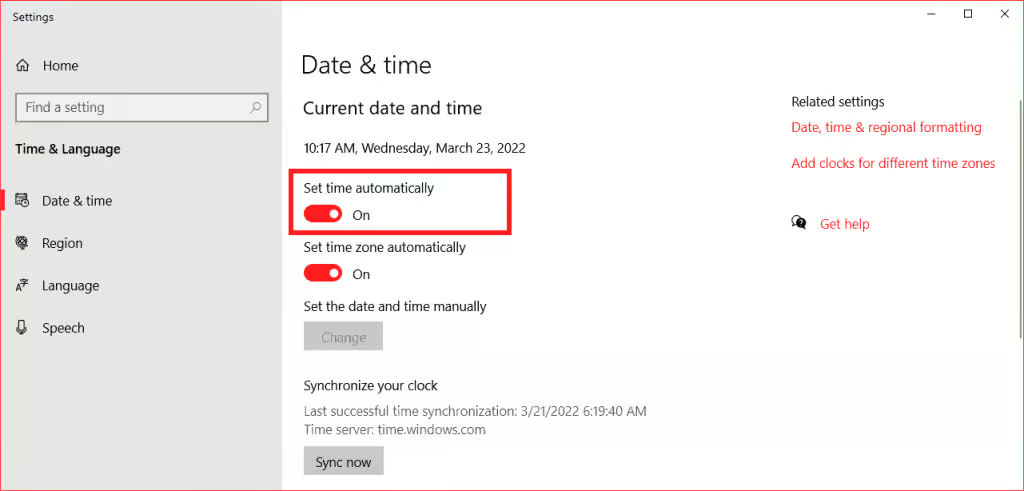
A common yet most ignored reason for the NET::ERR_CERT_AUTHORITY_INVALID error is unsynchronized clock. Your device has the wrong time or date set. If this is the only issue, then the good news is that it is quite an easy fix. Everyone knows how to fix the date and time on their device!
Use a Different Network
The NET::ERR_CERT_AUTHORITY_INVALID error can pop up if you use a public network. If you are using a public network on your smartphone, then the best choice in this case is to switch to mobile data. If the error disappears on mobile data, then you have identified the culprit.
Another solution is to use a virtual private network (VPN). You will be amazed at what a good VPN can achieve here.
Disable your antivirus or VPN
More often than not, the NET::ERR_CERT_AUTHORITY_INVALID error occurs when you use a VPN. You will have to be rid of the service in that case (just temporarily disable it).
Antivirus software can be another needle. You should disable your antivirus and then check if the error persists.
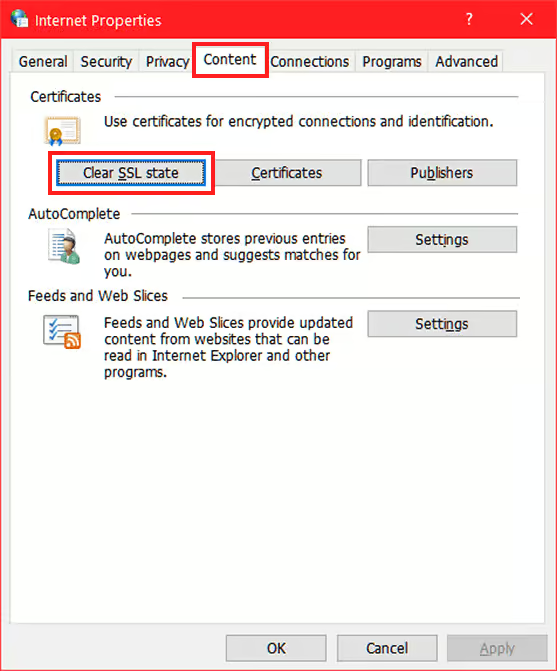
Wipe your computer’s SSL state
Your SSL state is practically a cache for certificates. Clear it and then retry the link. You may access it successfully this time.
You are free to check our knowledge base for more helpful articles!
Summary
The NET::ERR_CERT_AUTHORITY_INVALID error can be bothersome if you do not know the potential causes behind it. The best bit is that it is quite a fixable issue. There are various ways to fix the error; all of them lead to the happy ending you want!
Frequently Asked Questions
Does misplaced time cause this issue?
It is a potential culprit behind SSL errors. Make sure your date and time are right on time.
How to fix the NET::ERR_CERT_AUTHORITY_INVALID error?
Reload the page, clear the browser cache, or use incognito. Use these three as the first-hand solutions.
Should I disable antivirus or VPN?
VPNs or antivirus programs mess with SSL validation. Disabling them can help. Give it a try!
How to prevent the NET::ERR_CERT_AUTHORITY_INVALID error?
Rely on a trusted SSL provider. Renew your certificates on time. Do not forget to test your SSL setup through relevant tools. In any case, Hostonce is around to help you!
