
Linux is a powerhouse for developers, system administrators, and power users alike. Among its vast arsenal of command-line tools, sed is short for stream editor, as one of the most versatile and powerful utilities for text manipulation. Whether you are editing configuration files, transforming data streams, or automating repetitive tasks, sed can be a useful tool for Linux tasks.
In this article, we will discuss the sed command Linux, exploring its syntax, use cases, and practical examples.
What is Sed Command Linux
sed is a stream editor that reads input line by line, applies specified operations, and outputs the result. Unlike traditional text editors, sed works non-interactively and is ideal for scripting and automation. It is commonly used for:
- Searching and replacing text
- Deleting or inserting lines
- Extracting specific patterns
- Performing complex text transformations
Basic Syntax
The basic syntax of sed command in Linux:
sed [options] 'command' filecommand: The operation you want to perform (e.g., substitution, deletion).file: The input file (optional;sedcan also read from standard input).options: Flags that modify behavior (e.g.,-n,-i).

Hostonce’s Shared Hosting offers fast, secure, and scalable NVMe SSD hosting with easy customization, strong uptime, and great value.
Substitution with s
The most common use of sed is substitution using the s command:
sed 's/old/new/' file.txtThis replaces the first occurrence of “old” with “new” in each line.
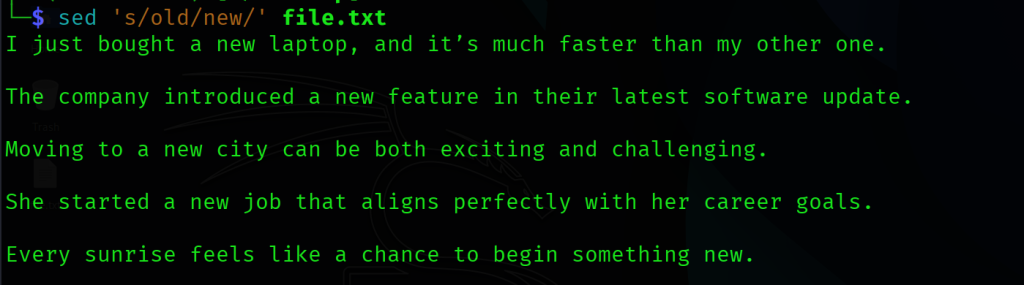
Let’s explore other variants of the sed command in Linux:
Replace all occurrences:
sed 's/old/new/g' file.txtCase-insensitive replacement:
sed 's/old/new/gi' file.txt
Deleting Lines
You can delete lines using the d command:
sed '2d' file.txtThis deletes the line 2 spacing between the first sentence and the second sentence.
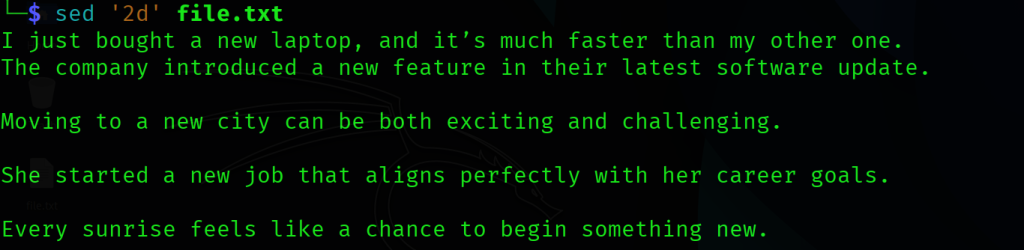
To delete a range of lines, you can use:
sed '3,5d' file.txtTo delete lines matching a pattern:
sed '/error/d' file.txt
Inserting and Appending Text
Use i to insert before a line and a to append after a line.
sed '3i\This is inserted before line 3' file.txt
sed '3a\This is appended after line 3' file.txt
Transforming Text
The y command is used for character by character translation:
sed 'y/abc/ABC/' file.txtThis replaces a with A, b with B, and c with C.
Regular Expressions
sed supports powerful regular expressions (regex) for pattern matching.
sed -n '/^[A-Z]/p' file.txtThis prints lines that start with a capital letter.
Chain Sed Command
You can chain multiple commands using -e or semicolons:
sed -e 's/foo/bar/' -e 's/baz/qux/' file.txtPractical Use Cases
Let’s explore how to use sed command Linux in real-world use cases:
Log File Analysis
Extract specific error messages or timestamps from massive logs.
sed -n '/404/p' access.logConfiguration Management
Automate updates to config files:
sed -i 's/timeout=30/timeout=60/' app.confData Cleaning
Remove unwanted characters or lines from datasets:
sed 's/[^a-zA-Z0-9 ]//g' data.txtBest Practices
The following are some best practices while using the Linux sed command:
- Always test your
sedcommands before using-i. - Use single quotes to prevent shell interpretation of special characters.
- Combine
sedwith other tools likeawk,grep, andcutfor powerful pipelines.
Conclusion
The sed command is more than just a text editor. From simple substitutions to complex data transformations, sed empowers users to manipulate text with precision and efficiency. If you are a system admin automating tasks or a developer parsing logs, sed is an important toolkit in your workflow.
FAQ
What is the sed command in Linux?
The sed command is a stream editor used to modify text in files or input streams.
How do I replace text using sed?
Use sed 's/old/new/' filename to replace text in a file.
Can sed edit files directly?
Yes, with the -i option, sed can edit files in place.
What are common uses of sed?
Sed is used for find and replace, deleting lines, and advanced text transformations.
Is sed faster than manual editing?
Yes, sed automates repetitive edits, making it faster and more efficient than manual changes.