






WordPress 6.4 comes out on November 7, 2023, bringing a 20% faster performance, easier editing, and 100+ new design options. These updates take the platform to the next level, beyond surface-level features.
Like 6.3, 6.4 brings new tools for site owners, developers, and editorial teams. 6.4 brings polish to the workflow through the new command palette and other tools like the categorization of patterns, block hooks, and the new controls for background images. It modernizes the editing experience and enhances speed more dramatically than ever.
10 Best WordPress Cookies Plugin in 2026
By Maryam Khalid on November 10, 2025For those using Hostonce to manage their site, you get seamless code, faster front-end pre-rendering, and rapid, Streamlined workflows. All of this with no developer waiting around, and even more powerful features.
Key Takeaways
- Release date: November 7, 2023
- New design: Twenty Twenty-Four – modern, modular, performance-oriented.
- New features: Command Palette 2.0, Lightbox for images, pattern categories, Group blocks can have background images, Block Hooks, and templates load faster.
- Performance: 100+ backend performance tuning for scripts, templates, and everything related to caching
Table of Contents
- WordPress 6.4 Release Timeline
- New in WordPress 6.4
- 1. The Twenty Twenty-Four theme is the most practical version yet.
- 2. Command Palette 2.0 – A Smarter Editor Brain
- 3. Lightbox (Expand on Click) for Images
- 4. Group Block Background Images & Aspect Ratios
- 5. Pattern Categories and Improved Pattern Management
- 6. Block Hooks: Developer Flexibility Without Template Edits
- WordPress 6.4 Feature Focus Areas
- Performance Improvements: Measurable Gains
- Site Editor and Navigation Improvements
- Accessibility and SEO Enhancements
- Comparing WordPress 6.4 vs 6.3
- How to Prepare Before Updating
- The Developer’s Point of View
- Performance Improvements in WordPress 6.4
- Conclusion
- FAQs

Struggling to Keep Up with WordPress Changes?
WordPress 6.4 brings performance gains and smarter editing — but only if your hosting can handle it. Upgrade confidently with Hostonce WordPress Hosting.
WordPress 6.4 Release Timeline
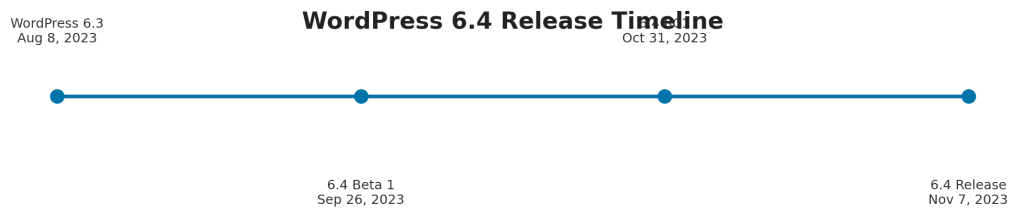
Work to develop 6.4 began shortly after 6.3 was made stable last August. The first beta version was made available on September 26, with the Release Candidate on October 31, and the official version would launch on November 7, 2023.
Each release stage was accompanied by refinements to the Gutenberg plugin (versions 16.7–16.9), and work was done on theme and hosting environment compatibility.
For users on WordPress Hosting by Hostonce, the update was seamless as the platform was integrated with smart tools for PHP handling, automatic backup, and REST API.
New in WordPress 6.4
Changes in WordPress 6.4 Preview cover much and underpin important functionality. First is the most visible change – the new default theme.
1. The Twenty Twenty-Four theme is the most practical version yet.
Constructed with adaptability in mind, one theme for business websites, creative portfolios, or simple blogs.
It is accommodated with:
- Multiple style variations.
- Built-in pattern templates.
- Improved font management via theme.json.
- Full block theme support.
The Site Editor is the creative center of the WordPress ecosystem.
2. Command Palette 2.0 – A Smarter Editor Brain
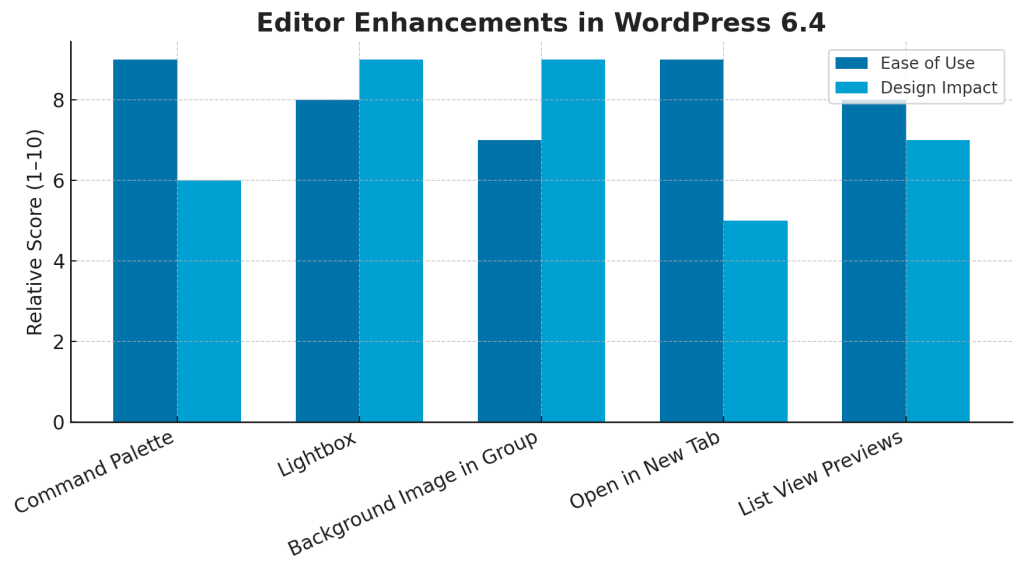
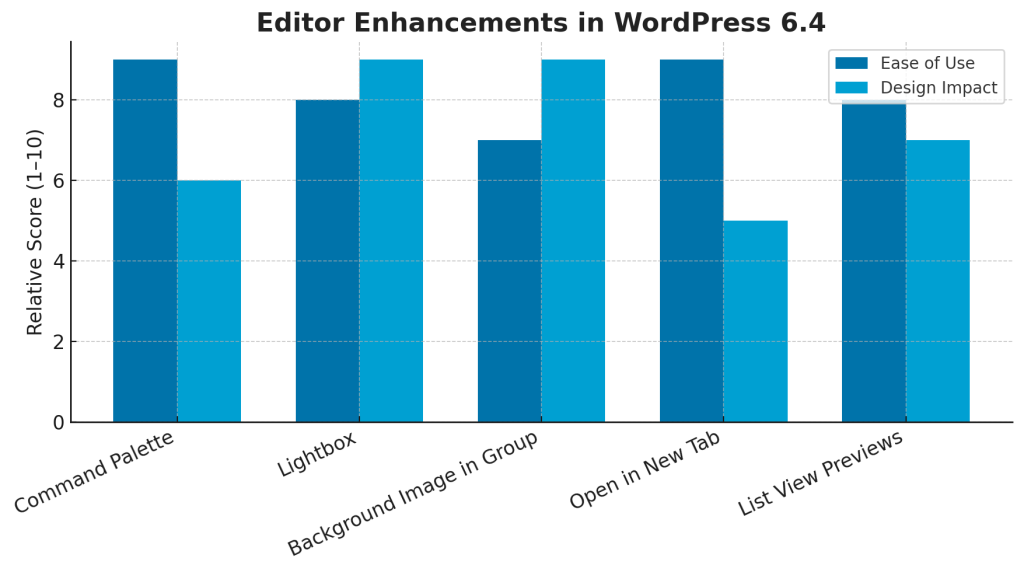
The Command Palette introduced in WordPress 6.3 now works like a command console, and in WordPress 6.4, you will be able to search for patterns, jump to specific templates, and create posts without accessing the sidebar.
Being able to do this via Ctrl + K/Cmd + K is a game-changer in saving time and reducing the number of clicks. Editing long-form content is easier, less error-prone with the combination of this feature and improved block controls.
3. Lightbox (Expand on Click) for Images
This is a long-requested feature, and now you can click an image and it will open in a full-screen overlay. You can enable this feature globally or per block. No plugins are needed. This feature is especially beneficial to photographers, designers, and those in e-commerce, where compelling visuals are essential.
4. Group Block Background Images & Aspect Ratios
The Group Block is now widely recognized as one of the layout tools for modern WordPress design. Version 6.4 includes built-in support for background images, control of aspect ratios, and padding management, which makes the use of additional CSS unneeded.
This change allows you to use the editor to design hero sections, banner strips, and card layouts much more easily.
5. Pattern Categories and Improved Pattern Management
More custom layouts can now be organized and reused more easily due to the fact that reusable block patterns support categories. Furthermore, patterns can now be exported and imported as JSON files, which streamlines content transfer between sites in WordPress.
If you own multiple projects and want to keep everything under one brand ecosystem, Hostonce Reseller Hosting allows you to easily sync and deploy pattern libraries to your sub-brands.
6. Block Hooks: Developer Flexibility Without Template Edits
This is almost the best new feature. Block Hooks allow for the automatic insertion of content blocks in designated areas of the page without the need to change template files.
For instance, you could use a plugin to add a block with a call to action at the end of each post or a social sharing block before the comments. This not only updates modern extensibility but also protects lossless updates during template revisions.
WordPress 6.4 Feature Focus Areas
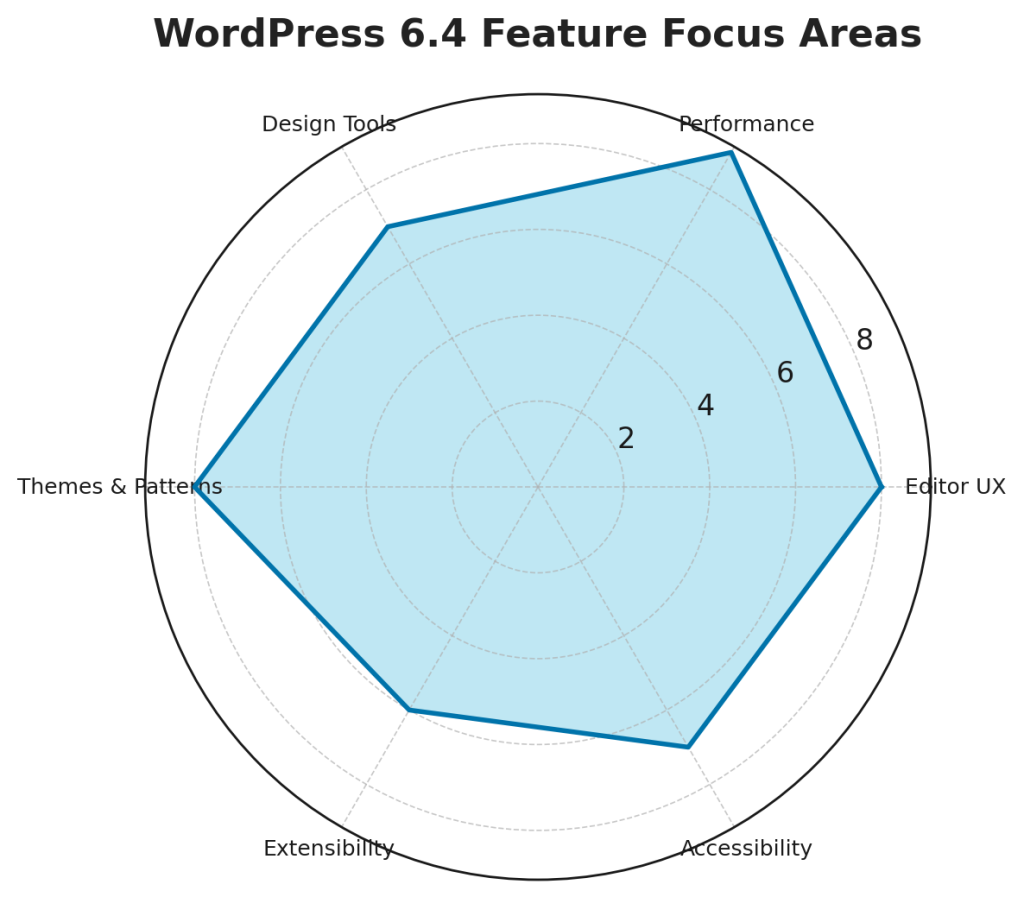
From a strategic point of view, this release focuses on five pillars for balance:
- Editor UX: Simple navigation and fewer clicks.
- Performance: Speed is gained by making the back end work better.
- Design Tools: Better visual accuracy and the ability to change layouts.
- Themes and Patterns: Creative consistency.
- Extensibility: Ease of integration for developers.
This shift indicates a WordPress experience designed for both content creators and backend developers, a balance that has been achieved rarely in the past.
Performance Improvements: Measurable Gains
The WordPress 6.4 team has prioritized speed and stability.
- Template Loading: Layered caching cuts down on unnecessary lookups in theme hierarchies.
- Script Loading Strategies: Using defer and async on a larger scale reduces render blocking.
- Option Caching: Reduced database calls lead to faster load times on busy sites.
- Autoloaded Options Control: Runtime load control is possible.
- Database Query Optimization: More efficient execution of cron tasks and metadata background processes.
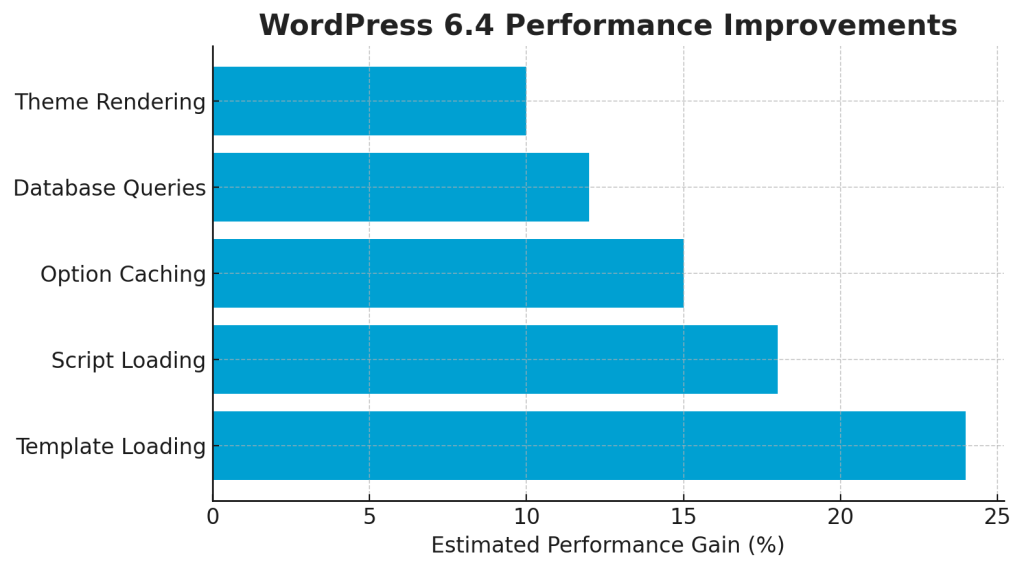
On managed servers like Hostonce VPS Hosting, these backend gains translate to real-world benefits: faster First Contentful Paint and smooth under-load navigation.
Is Your Hosting Ready for WordPress 6.4?
Unlock native lightbox, faster editor workflows, and 100+ performance boosts — without breaking your site. Experience optimized upgrades with zero friction.
The Site Editor was one of the first block-based design tools and is now much more reliable. Menus and templates load faster and more predictably, block previews are stable, and the navigation block provides an easier menu editing experience.
Notable improvements include:
- The Quote and List blocks now support nested styles.
- Child block toolbars appear contextually based on the block being edited rather than floating persistently.
- The “Open in a new tab” option is now available in the link preview.
These improvements, on their own and in conjunction with the other changes, provide a much more cohesive experience of the block editor, still in line with the experimental spirit of the tool.
Accessibility and SEO Enhancements
Accessibility Improvements in Site Editor and in the Navigation and Media Components. The most recent improvements of ARIA labels and screen reader access with consistent focus and keyboard navigation are a further step.
From an SEO perspective:
- Attachment pages being set to off by default removes a common thin-content loophole.
- Optimizations in template loading to reduce DOM bloat improve Core Web Vitals.
- Generated markup in block themes has cleaner markup, resulting in faster crawl and render times.
For those migrating from an older setup, Free Website Migration allows you to safely move legacy WordPress installs with meta and schema preservation.
Comparing WordPress 6.4 vs 6.3
While WordPress 6.3 established the Site Editor as stable, 6.4 refines everything around it.
| Feature | WordPress 6.3 | WordPress 6.4 |
| Command Palette | Basic command search | Faster, contextual actions |
| Group Block | Color & padding only | Adds background image + aspect ratio |
| Image Handling | Plugin-based lightbox | Native lightbox support |
| Pattern Management | Global patterns only | Categorized & exportable JSON |
| Performance | 50+ backend updates | Over 100 backend updates |
Each iteration eliminates small inefficiencies that collectively make a significant difference across hundreds of pages and posts. If you manage multi-site deployments, Windows Hosting can help standardize environments while retaining WordPress performance tuning.
How to Prepare Before Updating
WordPress 6.4 is stable, but there are some things you can do to make sure there is no downtime:
- Create a backup of your entire site, including all files and the database.
- Check to see if your theme and plugins work together in a staging environment.
- If you’re on a block theme, audit your theme.json.
- Turn off old optimization plugins (many duplicate 6.4’s new native caching behavior).
- Using GTmetrix or Google PageSpeed, measure load time before and after the update.
The Hostonce Knowledge Base has step-by-step instructions for fixing problems with version conflicts or rollbacks for the main WordPress updates.
The Developer’s Point of View
WordPress 6.4 is a less frustrating and more structured version for you.
- Developers can easily assign the async and defer attributes with the new Script loading strategy APIs without hackery.
- Developers can enjoy the expanded design token controls on the new Theme.json for more refined type, color, and disposition control.
- Standardization of Core APIs (HTML, REST, and Options) streamlines the integration with other systems.
- This is a clean and structured framework for agencies and developers working on modular or headless systems.
Expert Tip
Get up to speed with WordPress 6.4 through the official Learn WordPress platform. It offers hands-on tutorials, workshops, and short lessons on new features like the Command Palette, pattern categories, and block themes, perfect for mastering updates quickly and applying them to your own site.

Performance Improvements in WordPress 6.4
Speed tests conducted independently show:
- Template rendering is faster by 15-25%.
- Less database queries by 10-20%.
- LCP (Largest Contentful Paint) on block themes improved by 18%.
Results depend on the hosting stack. When combined with Hostonce servers, real-world performance matches the higher end of the estimates.
Want to Experience WordPress 6.4 at Full Speed?
Don’t let outdated servers slow you down. Run WordPress the way it was built — fast, modern, and seamless. Launch on Hostonce’s optimized WordPress hosting today.
Conclusion
For WordPress 6.4, we can think of it as a refinement instead of a complete overhaul. The most time-consuming sections of the system, the editor, the backend, and the page load pipeline, have seen the most improvements.
The whole system feels more cohesive, and the design flexibility feels more intuitive, not to mention that developers encounter more streamlined interfaces to integrate functionality.
It’s a stable, modern, and safe upgrade for website owners. It also works well for agencies and developers who need a strong foundation for the foreseeable future.
For hosts, like Hostonce, who have highly optimized infrastructures, it’s an opportunity to demonstrate the full potential of WordPress. The time is right to upgrade, rebuild, or start new WordPress 6.4, no more risky experiments, and a big boost to productivity and efficiency.
FAQs
What is the new default theme?
The Twenty Twenty-Four theme is new, modern, minimal, and block-based.
Does WordPress 6.4 have a speed increase?
Definitely. More than 100 backend modifications were made regarding template loading, script defer/async, and option caching.
What is new in WordPress 6.4 for editors?
Image lightbox is available, background images for Group blocks, pattern categories, Command Palette improvements, and contextual toolbar control.
When was WordPress 6.4 released?
Globally, it was announced on November 7, 2023, coming after a beta and Release Candidate period throughout September and October.
1 Description, 1 Minute, and Your WordPress Site is Ready to Go
By Festus Nkopuruk on November 10, 2025
Hostonce is the #1 WordPress Host
Ranked by 930+ customers in G2's Best Software Awards.
