The announcement of the introduction of the WP REST API dates back to 2013. It was created as a plugin but was originally intended to be integrated into the WordPress core by Version 4.1. Some issues caused the release to be delayed, and it wasn’t integrated into the core until three years later with the release of WordPress 4.7.
Adding the WP REST API was a big step forward for WordPress. It made it much easier for different applications to connect with WordPress sites, which led to more flexible website designs, mobile app connections, and headless WordPress options. Now, the API is the backbone for many new WordPress features and third-party tools, making it possible for developers to build faster and more dynamic websites.
WordPress Hosting vs Web Hosting: Advantages and Disadvantages To Help You Choose
By Javeria Riaz on October 11, 2025Key Takeaways
- Developers can access WordPress from outside of the WordPress installation itself by using the WP REST API. Developers use JavaScript to access it and create interactive websites and applications.
- When REST and API combine, the WordPress REST API forms a collection of code that enables other systems to communicate with WordPress and constructs itself in a way that guarantees these systems can communicate with each other.
- It supports a variety of WordPress-based apps and converts WordPress from a content management system into an application platform.
- The WP REST API enables WordPress to serve a greater variety of purposes. It powers web-based single-page applications (SPAs) through an application platform, while content management systems manage complex websites effectively.
What is WordPress REST API?
Developers can access WordPress from outside of the WordPress installation itself by using the WordPress REST API. Developers use JavaScript to access it, so they build interactive websites and applications, like online stores, with it.
API is for Application Programming Interface, and REST stands for Representational State Transfer. Let’s examine the meanings of each of those.
API stands for Application Programming Interface
An Application Programming Interface (API) defines a communication protocol or interface between a client and a server and helps make client-side software development easier and smoother.
Transfer of Representational States (REST)
Web systems can communicate with one another using standards provided by Representational State Transfer, or REST. Two systems wouldn’t be able to communicate with one another and exchange data without REST.
When combined, REST and API form the WordPress REST API, a collection of code that enables other systems to communicate with WordPress and guarantees that these systems can communicate with each other.
It implies that a mobile app or a third-party website, for instance, can access your WordPress website database, retrieve data from it, and add data to it.

Get The Most Out Of WP REST API!
Get the fastest performance and keep your WP REST API optimized with HostOnce’s fastest WordPress hosting solutions.
Expert Tip
By sending a request using cURL via WP-CLI, you can verify that WordPress core has the REST API enabled by default. In order to reach an endpoint that functions as a function that modifies data, you must specify the HTTP method and the route. Make sure you use appropriate authentication, such as OAuth or Basic Auth, while utilizing this feature. Additionally, to preserve the WordPress REST API’s performance under heavy traffic, keep your code brief and make use of caching.

Why Is The REST API WordPress Important?
The WP REST API ensures compatibility across programming languages by offering endpoints for content retrieval and manipulation as JSON data.
Creating a bespoke application that utilizes the data or capabilities of the CMS is one of the use cases for REST APIs. For example, you can set up a headless WordPress to build a website based on a contemporary framework like React on top of the admin dashboard.
Managing a WooCommerce store like an online boutique with the REST API is another use case. You may update product information in bulk, process orders programmatically, and automate inventory management activities.
REST API And JSON
An application programming interface is called an API. REST, which stands for “REpresentational State Transfer,” is a collection of ideas for accessing and representing the data in your application as connected objects and collections. The WordPress REST API provides REST endpoints (URLs) that represent posts, pages, taxonomies, and other built-in data types.
To query, edit, and create content on your website, like your multilingual website, your application can send and receive JSON data to these APIs. JSON is a lightweight, human-readable, open-standard data format that resembles JavaScript objects. JSON is also returned when you transmit or request content from the API.
Developers can create WordPress applications in client-side JavaScript (such as the block editor/Gutenberg editor), as mobile apps, or as desktop or command line utilities because JSON is widely supported in many programming languages.
Let’s also quickly examine the three main JSON requests that you will utilize with the REST API. They are:
- GET. Data is retrieved and listed from the API using this kind of request.
- POST. Data is sent to the API via this request.
- Delete. This request is used to remove data, as the name implies.
Examples of WP REST API
If you want to know why use WordPress REST API, the answer is it is useful for many applications and jobs related to web development. For instance, you can distribute material by retrieving posts from the CMS and displaying them on other websites.
Enabling data submission to the WordPress backend from an already-existing static site is another use case. Because you can use the CMS’s data storage capabilities rather than manually establishing a database, it streamlines the development process.
Claim Your Error-Free Domain Now!
Secure a unique online identity that reflects your business idea. Register your error-free websites in seconds with HostOnce!
You may also change the content of your website automatically with WordPress API integration. For instance, you may use the PUT technique to push posts from Apple News to your website without having to log in.
Using WordPress REST API
Here are a few typical applications for using WP REST API:
Content Updates and Deletions
Using its ID, you can change a particular post, page, like a product page for a restaurant website, or a custom post entry using the WordPress REST API PUT function. For instance, you can modify the publishing status or add new content.
Although the post ID is at the end of the route, the syntax is comparable to other API call methods:
PUT http://domain.tld/wp-json/wp/v2/posts/ID
Next, indicate which data you wish to change. For example, add the following code to add new content:
{ “content” = “publish” }
You also use their ID to delete posts, pages, or custom post entries, as shown in the following example:
DELETE http://domain.tld/wp-json/wp/v2/posts/ID
By default, the DELETE method shifts data to the recycle bin so you can retrieve it at a later time if necessary. Add the force parameter as follows for permanent deletion:
DELETE http://domain.tld/wp-json/wp/v2/posts/567?force=true
Using GET Requests to Fetch Data
To obtain data from your WordPress website using the JSON REST API, use the GET method. You can retrieve material, for instance, from the posts endpoint:
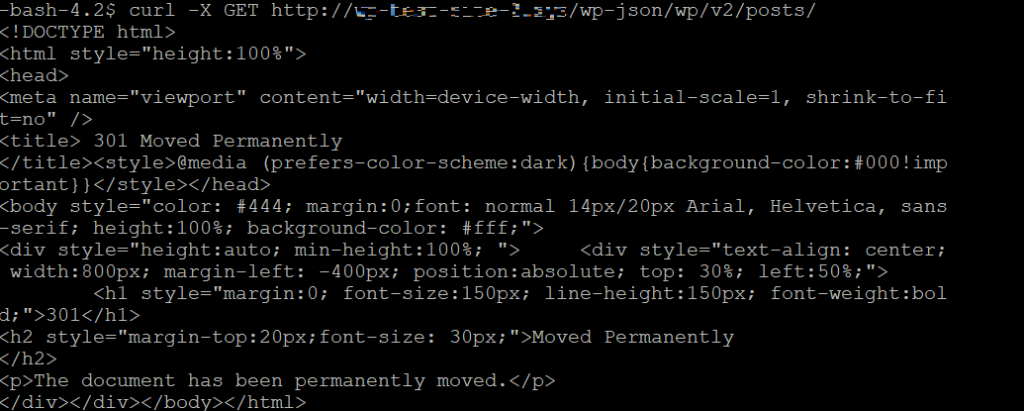
GET http://domain.tld/wp-json/wp/v2/posts/
This API call prints all posts from your WordPress website, including details like ID, content, and title. The output should look like this if you run it with cURL.
Additionally, you can use the matching endpoint to retrieve pages:
GET http://domain.tld/wp-json/wp/v2/pages/
The command will retrieve all pages rather than posts, but the outcome is the same. Additionally, you can query custom post types by entering their name in the endpoint:
GET http://domain.tld/wp-json/wp/v2/custom-post-type/
To obtain product pages or custom posts, for instance, use the following prompt:
Obtain https://domain.tld/wp-json/wp/v2/product-page
To change the output, such as paginating or sorting the data, you can use a query parameter. To reorder posts according to their creation date in ascending order, for instance, use the following endpoint:
/wp-json/wp/v2/posts?orderby=date&order=desc
In the meantime, to retrieve a certain number of articles from a certain page, utilize the page and per_page query options. Here is an illustration:
/wp-json/wp/v2/posts?page=2&per_page=10
The GET method will combine postings into several pages, each with ten entries, and retrieve the second page using the endpoint.
To filter data according to particular criteria, WordPress offers many additional query options. See the documentation regarding the posts REST API references to find out more about them.
How to Disable the REST API for WordPress?
You can disable the WP REST API if you don’t want apps to be able to access data from your website. Keep in mind that anyone, not just you, may have access to public data.
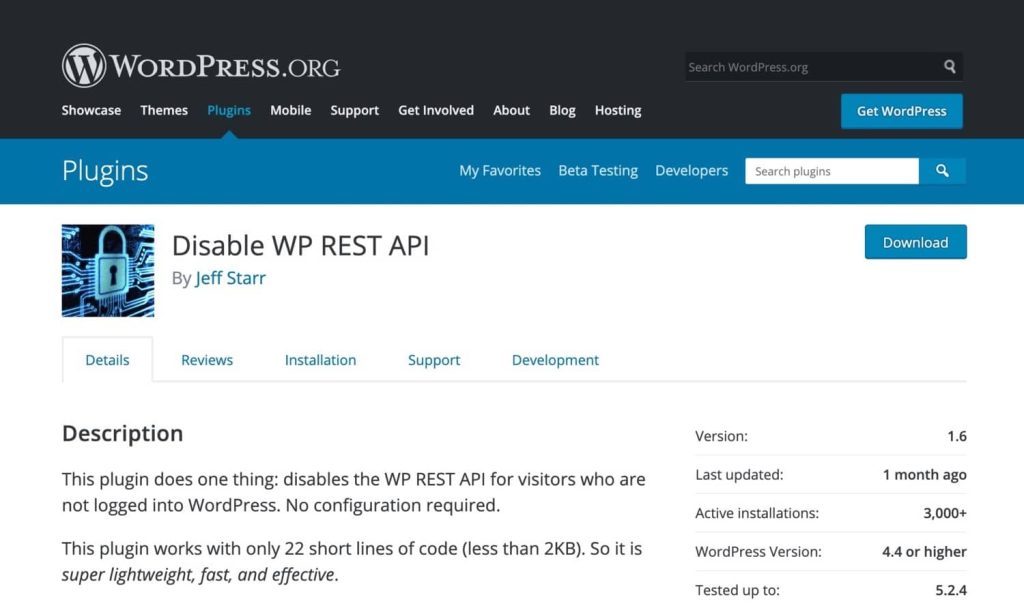
Installing the Disable WP REST API plugin will accomplish this. This prevents anyone who isn’t logged into your website from using the REST API.
As an alternative, you can create your own plugin or add some code to the functions file of your WordPress theme. Since this isn’t theme-specific functionality, it’s preferable to develop a plugin.
Add simply two lines to your plugin:
add_filter(‘json_enabled’, ‘__return_false’); add_filter(‘json_jsonp_enabled’, ‘__return_false’);
The REST API for your website will be totally disabled as a result.
Optimize Your Slow Websites Now!
Give your website the speed and performance it deserves with optimized and premium hosting solutions by HostOnce.
WP REST API And WordPress Development
Applications can communicate with a WordPress website by sending and receiving data as JSON (JavaScript Object Notation) objects thanks to the robust WordPress REST API. It is an essential part of contemporary WordPress development, providing a standardized, organized way to access and modify WordPress data, including posts, pages, users, comments, and taxonomies.
The REST API enables a headless WordPress architecture, in which WordPress serves as a backend content management system (CMS), and content is consumed via the API by a different frontend application (developed using frameworks like React, Vue, or Angular). This makes frontend design and development more flexible.
Conclusion
Your CMS may easily communicate with third-party web services thanks to the WordPress REST API capability. It is frequently used to build headless CMSs or applications with WordPress content.
For both WordPress users and developers, the WordPress REST API offers intriguing potential as well as some thrilling difficulties. It’s WordPress’s future and will probably fundamentally alter how we use and build the platform.
FAQs
Does WordPress support the REST API?
WordPress has a REST API of its own. This makes it possible for the platform to interact with nearly any other website or web application, regardless of the programming language they employ.
Who should learn the REST API for WordPress?
Learn REST API if you're an aspiring WordPress developer who wants to use the CMS capabilities to create an application or online service. Additionally, it is crucial for users who want to move their content to another platform or create a WordPress headless CMS.
Is the WordPress REST API safe?
As long as you use HTTPS, implement appropriate authentication, and adhere to security best practices, the WordPress REST API is safe.
What Advantages Does Using the WordPress REST API Offer?
WordPress may be integrated with other online services using the JSON REST API. Without requiring users to engage directly with the dashboard, it provides direct access to the data and capabilities of the CMS.
WordPress 6.3: What’s Coming in the Next Major Update
By Festus Nkopuruk on November 7, 2025
Hostonce is the #1 WordPress Host
Ranked by 930+ customers in G2's Best Software Awards.