Did you know? Images alone take up about 51% of the space occupied by posts and pages on your website. All of your website content, i.e., images and other media files, databases, and sometimes email, is stored in your web hosting disk space. It is one of the most important resources your website needs for optimum performance. Still, even with its importance, many website owners overlook it when choosing a hosting plan.
This article will explain what web hosting disk space is and help you answer the question “how much disk space does a website need?” The article will also show you how to manage your available website disk space to avoid slow load speeds and other website performance issues.

Hostonce vs Bluehost Shared Hosting WordPress: Which Hosting Service Delivers Better Value?
By Javeria Riaz on June 15, 2025Key Takeaways
- Disk space is the amount of server space available for you to store your site’s content.
- Limited website disk space blocks you from uploading new files or installing the plugins and features your site needs to grow.
- A full disk can prevent critical security updates from installing, putting your site at risk.
- Different websites require different amounts of space depending on the kind and amount of content you need to store. Simple sites can use from 1–5 GB but other heavy sites like ecommerce stores require more space.
- Managing disk usage by optimizing images, clearing caches, and deleting unused files keeps your site fast and your hosting plan efficient.
What Is Web Hosting Disk Space
In web hosting, disk space is the amount of hosting storage available for storing your website’s content. This content includes databases, pages, posts, videos, images, files, and sometimes even emails. You can think of your web hosting disk space as the digital wardrobe of your website.
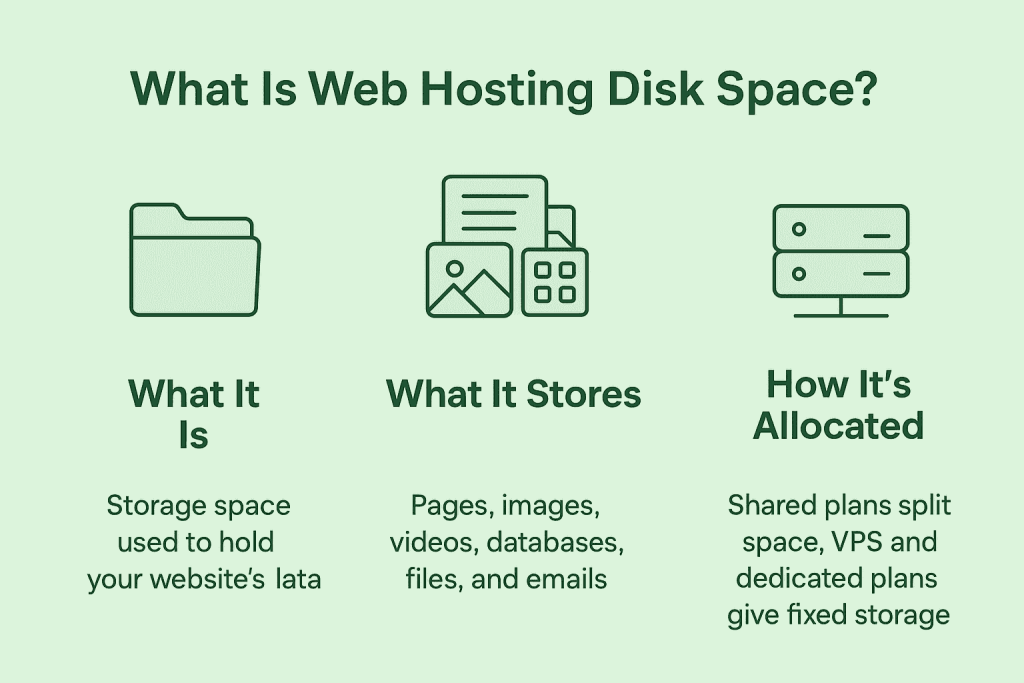
The amount of hosting storage available to store your website’s data depends on your hosting plan and your hosting provider. Many hosting plans start at 5 GB or 10 GB of storage, with options to upgrade to 100 GB or more as your content needs grow.
In shared hosting plans, users who share the same server also share the same disk space. One user may use more space than others, limiting how much space remains for everyone else. In more advanced hosting options, such as VPS and dedicated hosting, you get a fixed amount of space exclusively for your use.

Hosting That Fits Your Website’s Needs
Hostonce offers flexible hosting plans designed to match your site’s disk space, performance, and growth requirements.
Why Disk Space Matters in Web Hosting
Your website disk space does more than just hold your website data. It affects other key aspects of your website’s functionality. This section will show you why it is important to consider disk space in web hosting.
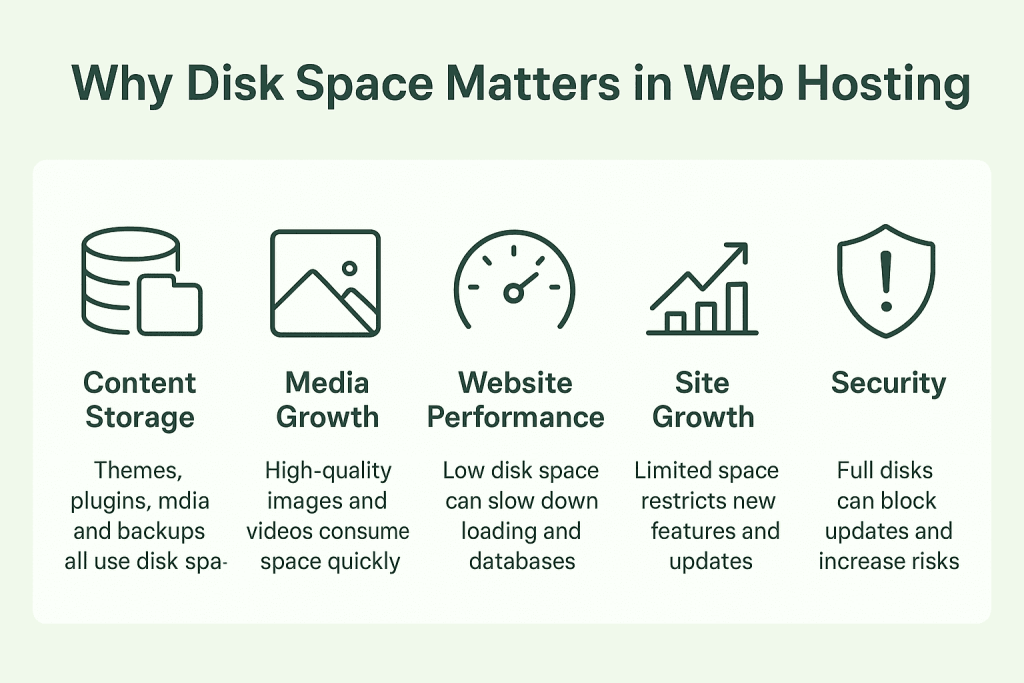
1. Content Storage
Your WordPress site needs enough disk space to store its data. While it is fine to start small, your website’s storage requirements will increase as you carry out the following activities:
Add themes and plugins: Every plugin and theme you install takes up additional space on your site. Themes and plugins with complex features or functionality usually consume even more storage.
Upload media: Media uploads are one of the most common ways disk space gets used up quickly. High-resolution images and uncompressed videos can rapidly fill your allocated hosting storage. In simple terms, the more media you upload, the more space your website will require.
Backups: Regularly backing up your website’s data is essential for security and recovery in case of data loss or cyberattacks. However, backup files do not disappear into the cloud by themselves. They occupy storage space on your server just like any other file.
2. Website Performance
The amount of space available for your website to store data has a significant impact on its performance. When your website reaches its disk space limit, images and scripts may load slowly, negatively affecting user experience. Limited storage can also strain the system, causing database queries to take longer to execute. For optimal site performance, your available disk space must match your site’s functionality and content needs.
3. Functionality and Growth
Having insufficient disk space to store your website’s data can limit your site’s functionality and growth. You may experience website downtimes, difficulty uploading new media files, and you may also be unable to install new themes and plugins. In some cases, limited storage can even affect how well your existing themes and plugins function.
4. Security Risks
A full disk poses security risks to your website. Security updates and patches often require additional space, and when your disk is full, these updates may fail to install. This leaves your website vulnerable to attacks. Having a larger disk space is therefore important for keeping your website safe.
Get More Disk Space For Better Performance
Hostonce VPS hosting provides dedicated storage and resources tailored for websites that have outgrown shared hosting plans.
How Much Disk Space Do You Need in Web Hosting?
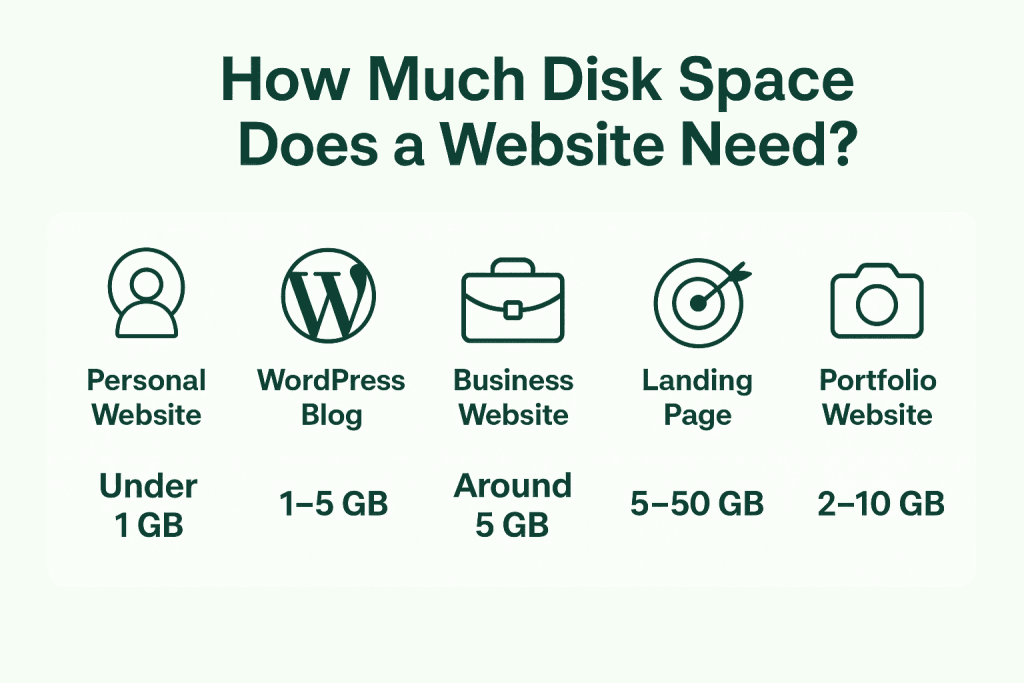
To answer the question “How much disk space does a website need?” we have to consider its expected functionality and the number and kind of files it will store. Most websites can work well with only about 1 GB to 10 GB of disk space. For example, personal websites, blogs, and business sites usually require less than 5 GB, but image-heavy or dynamic sites like ecommerce stores or forums require 10–50 GB. Before choosing a hosting plan, it is important to know how much space your website will need so you can plan easily and make room for backups and future growth.
Personal Website
A personal website is a type of site that showcases your identity, skills, and achievements. Personal websites mostly have just a few static pages and a few images, so they do not use much storage. Most of them remain under 1 GB even with multiple pages and media. So, if you are looking to build a personal website, a basic hosting plan with small storage allocations is totally suitable.
WordPress Blog
WordPress blogs are content-based sites built using the WordPress platform. The site normally contains content such as posts, images, other media files, plugins, and a database. Most of the storage space of WordPress blogs is taken up by media and plugins. Usually, 1–3 GB of disk space is good enough for a WordPress blog. You could get up to 5 GB of hosting space for your blog to serve as a buffer for future growth.
Business Website
Business sites usually contain content such as service pages, team photos, brochures, and other branding assets. Sometimes, business sites also store messages if email hosting is included in their hosting plan. A 5 GB hosting plan provides enough room for both your website and day-to-day business communications.
Landing Page
Landing pages are single-page sites meant mainly for product or service features. They usually contain just some text, images, and a few other features that could boost visitor engagement or prompt the visitor to perform a required action. The most basic hosting plans with as little as 100 MB of space can work well for a landing page site.
eCommerce Website
eCommerce websites usually require a lot of disk space because of the kind of content they store. Online stores usually store content such as product images, order records, customer data, platform files, as well as plugins and software used for payments and other functions. A small online store can work well with 5 to 10 GB of disk space. Larger stores with hundreds of products and image listings require much more space, especially if the site owner decides to back up files locally.
Portfolio Website
Portfolio websites are personal or professional sites used to showcase your work, projects, or creative achievements. Depending on the owner, a portfolio website could be content-heavy or light. For example, a creative professional such as a photographer or videographer would have a heavier portfolio website because of the number of high-resolution images and videos uploaded. Depending on your use, a 2 GB to 10 GB hosting plan is suitable for a portfolio website.
Expert Tip
Always aim to keep at least 20–30% of your web hosting disk space free at all times. This buffer ensures your site has room to process updates, generate cache files, run backups, and handle sudden traffic spikes without slowing down or breaking. Keeping this headroom also reduces the chances of hitting inode limits and helps maintain smooth performance as your site grows.

How Much Disk Space Are You Using?
There are different ways to check how much disk space your website is using, depending on the tools available at your disposal. Some of the options include;
Check Disk Usage and Database Size in cPanel: If your web hosting provider uses cPanel, you can see a summary of your overall disk space usage from your cPanel dashboard. If your hosting provider does not use cPanel, there are other ways you can check your website’s disk space.
Check Disk and Database Usage with Site Health Tool: If your hosting provider does not use cPanel, the easiest way to check your disk space usage is by checking with the site health tool. Just navigate to tools on your website, select site health and select directories and sizes. This would give you a breakdown of your disk space usage and help you manage your files.
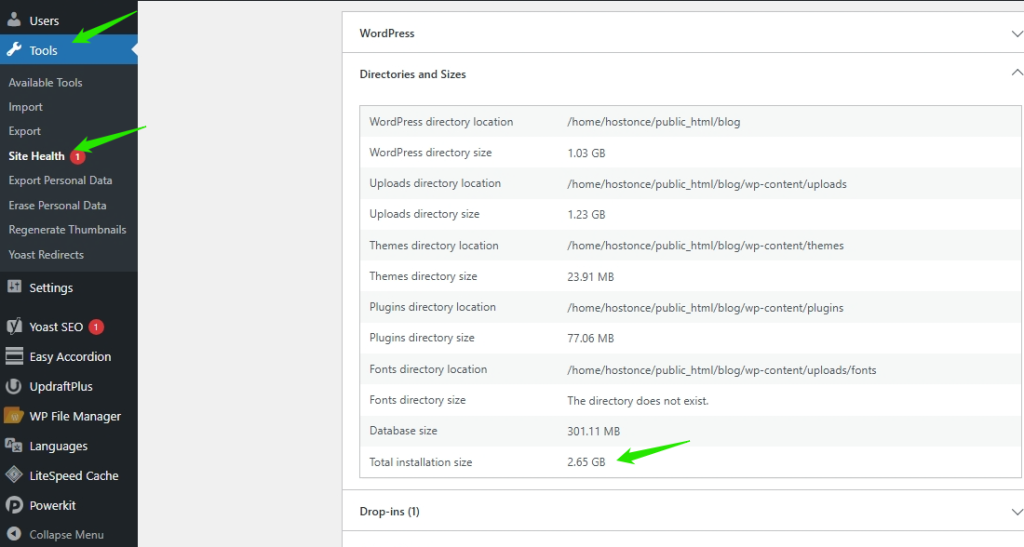
Other ways to check your disk space usage is by using WordPress plugins like WP Disk Free or through phpMyAdmin. The phpMyAdmin method is usually unavailable on most websites.
Reducing Disk Usage in WordPress
Here are some instant tips to save disk space and ensure your hosting plan has sufficient space for growth.
Use optimized images and media files
As revealed by the HTTP Archive, images make up about 51% of the space used by website pages. To better manage your disk space, it is important to reduce the sizes of your image uploads and other media files. You can choose from various tools that help reduce the size of your media files without compromising quality. Additionally, altering the file format and dimensions can lead to up to an 80% reduction in your image size. Aside from saving space, this also enhances your site’s loading speed and boosts your SEO rankings.
Ready for a Hosting Plan That Fits Your Storage Needs?
Migrate to Hostonce and get scalable disk space designed to grow with your website, and guarantee you optimum performance.
Clear cache and old backup files
Web caching is crucial for speeding up your website and enhancing user experience. However, using cache plugins can generate several cache files, which can increase inode usage in WordPress. To reduce this and ensure optimal performance, it is recommended that you clear your WordPress cache regularly. You can also choose to store your backups on your local machine to reduce the amount of space they take up on your website.
Delete inactive plugins and themes
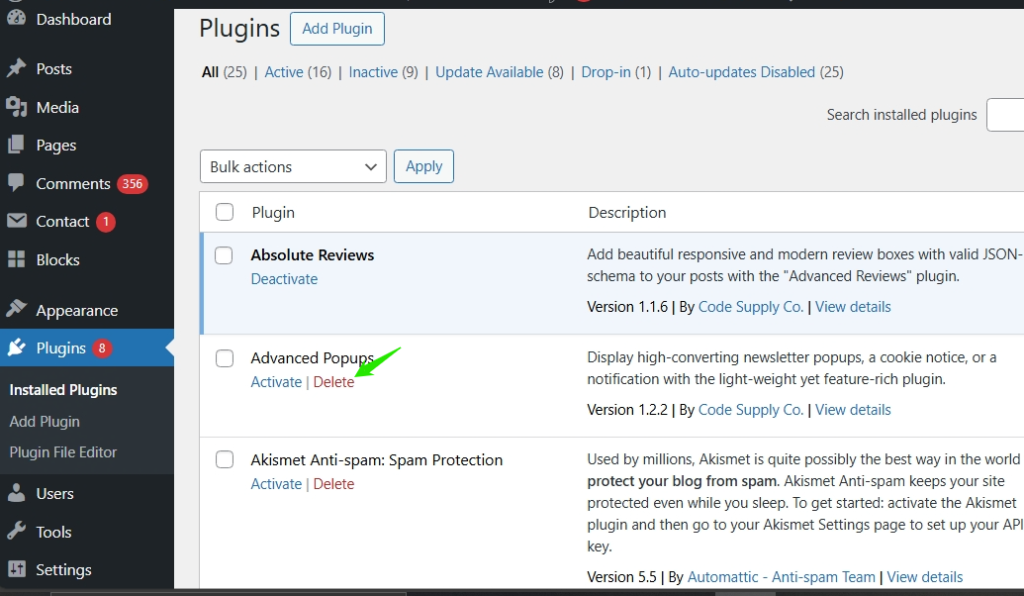
Inactive WordPress themes and plugins still use inodes and occupy disk space. Remove all unused plugins and themes to free up your disk space and reduce inode usage. To remove inactive plugins, simply navigate to Plugins > Installed Plugins in your WordPress admin panel. Then, click the Delete button for any plugin that is not in use.
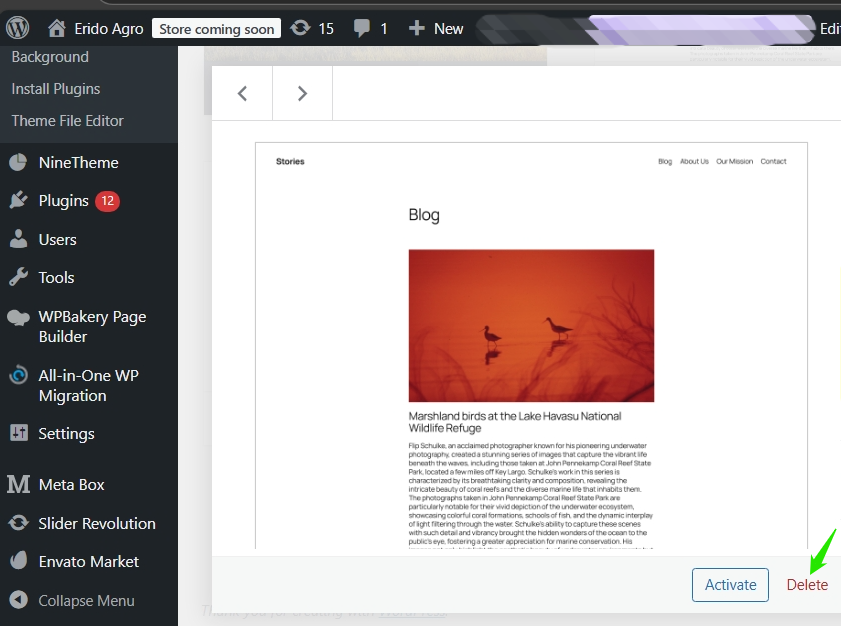
To remove inactive themes, go to Appearance > Themes in your WordPress dashboard. Select the theme you want to delete. A new pop-up window will emerge, displaying the details of your WordPress theme. Click the ‘Delete’ button at the bottom of the page.
Delete Draft Blog Pages and Posts
To clear up draft pages, Navigate to Pages > All Pages in your WordPress dashboard. For posts, Navigate to Posts > All Posts
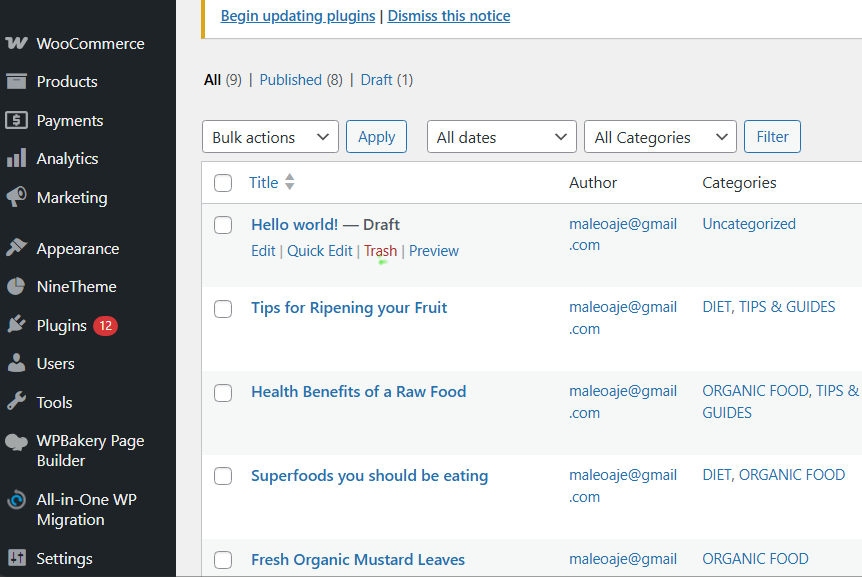
After that, click the ‘Trash’ button under any draft blog post or page.
Clean your WordPress media library
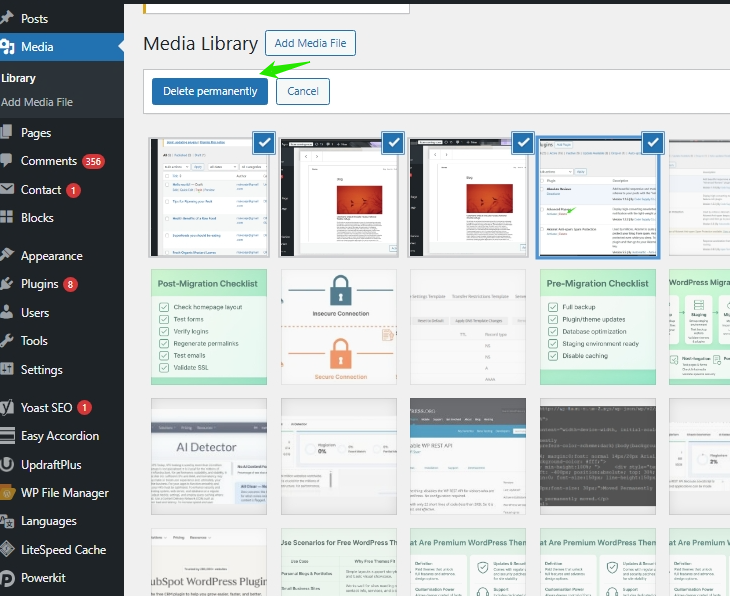
Remove unused media files, redundant copies of the same image, etc. will help free up disk space and reduce inodes usage in WordPress. Just go to Media > Library in the WordPress dashboard, select an image you want to remove, and click the ‘Delete permanently’ option.
Conclusion
“How much disk space does a website need?” Sometimes, you don’t need as much disk space as you think you do and at other times, you need more. To optimize your website for optimal performance, it is important for you to consistently monitor your disk space usage. Also, doing routing clearance of inactive themes and plugins, cache and redundant media files can also help you free your disk space and help you save money on hosting. Freeing up your disk space does not only give you more space to store your site’s data, it impacts your page speeds and helps to boost your website’s SEO rankings.
Top 10 Must-Have Plugins for WordPress Website in 2026
By Javeria Riaz on October 12, 2025FAQs
How much disk space does WordPress need?
WordPress requires very little disk space, around 1GB for a basic installation. However, this doesn’t include themes, plugins, media like images and videos, and content like blog posts and pages.
What are the effects of exceeding my web hosting disk space limit?
Exceeding the disk space limits can certainly cause downtime, slow down website speeds, cause issues with updating, email problems, and inability to upload new files. Moreover, it could result in extra fees or an upgrade to a higher hosting plan.
How frequently should I review and evaluate the disk space usage of my website?
It is advisable to regularly check your disk space usage, particularly during content updates or when implementing new features, to avoid reaching storage limits.
Why Is it important to evaluate web hosting disk space when choosing a web hosting plan?
Assessing web hosting disk space provides the crucial information required to indicate how much data, files, and content your website is capable of holding. Insufficient disk space results in poor performance, while extra disk space only unnecessarily raises the costs associated with hosting.

Hostonce is the #1 WordPress Host
Ranked by 930+ customers in G2's Best Software Awards.