






WordPress continues to evolve with each new version. Providing users with more user-friendly tools, more design options, and better speed. With version 6.7 on the horizon, site owners, developers. WordPress 6.7 is all about equipping you with more options without complicating your process.
New APIs are offered to programmers in WordPress 6.7. Better theme support and better compatibility for today’s web standards. WordPress 6.7 is shaping up to be one of the most user-focused updates yet. In this article, we’ll cover the five hottest changes that are coming down the pipe.

10 Best SEO Plugins for WordPress in 2026
By Favour Brown on November 10, 2025Why WordPress 6.7 Matters

With tougher competition in the content management space. With this release. Clearly, the development team has been listening to community feedback and addressing key pain points. Full site editing, WordPress’s greatest feature in recent years, returns as the headlining act in version 6.7. The vision is to offer users total control over the structure of their site without ever needing to manipulate a line of code.
Improvements to pattern workflows, block customization, and visual editing all work toward making it possible and enjoyable to build an entire site from within the editor. Why WordPress 6.7 is important is that it’s all about performance optimization. Known for its high-speed WordPress hosting, free SSL, and domain registration.
Google’s Core Web
With Google’s Core Web Vitals affecting search rankings, site owners are under pressure to deliver responsive, fast experiences. WordPress Hosting maintains ensuring that features to create content and manage sites are available to as many people as possible. From improved keyboard navigation to improved support for screen readers.
Version 6.7 moves the platform forward in digital accessibility. In the developer community, the WordPress 6.7 release date introduces more intelligent APIs, more customizability in theme.json, and more interactivity with less reliance on JavaScript frameworks. This one’s worth your attention.

Upgrade to the Latest WordPress Experience
Take full advantage of WordPress 6.7 with fast, secure, and reliable hosting. Get started today with HostOnce WordPress Hosting and unlock the best performance for your website!
Advanced Pattern Management Tools
- Users can now create and apply types to their custom patterns for enhanced organization and availability.
- Quickly toggle between reusable (synced) and once-off (unsynced) patterns for design freedom.
- Reorder your patterns within the editor with a seamless drag-and-drop interface.
- Edit patterns live within the editor without constantly switching between multiple windows.
- More streamlined, faster pattern selection screen with visual previews for more efficient workflow.
- Admins can now define which user roles can create or edit patterns for improved content governance.
- Quickly find saved or default patterns with improved keyword-based search.
- Transfer custom patterns between sites with built-in export/import functionality, ideal for agencies and multisite site owners.
Create, Organize, and Sync Designs with Ease
They’re now effortlessly integrated into the design flow with more prominence and flexibility. You can simply employ patterns to create call-to-action blocks or content arrangements. The ability to add custom categories for patterns is a huge timesaver. This reduces time spent searching and gives you consistency across pages.
Synced patterns act like global components; edit one, and all the instances update. Unsynced patterns are isolated. Having the option for one-off customization. Having the dual-mode ability gives users complete control over structure and creative variation.
The drag-and-drop interface in WordPress 6.7 streamlines pattern management. You can reorder patterns in the pattern manager. Visual previews in the pattern library. Most significant is the inline editing of patterns. Edits are made in real-time, in the block editor. Together, all of these enhancements make patterns an inherent part of creating content, not a hidden feature. WordPress 6.7 brings them up to the rank of go-to.
Improved Block Handling and Better UX
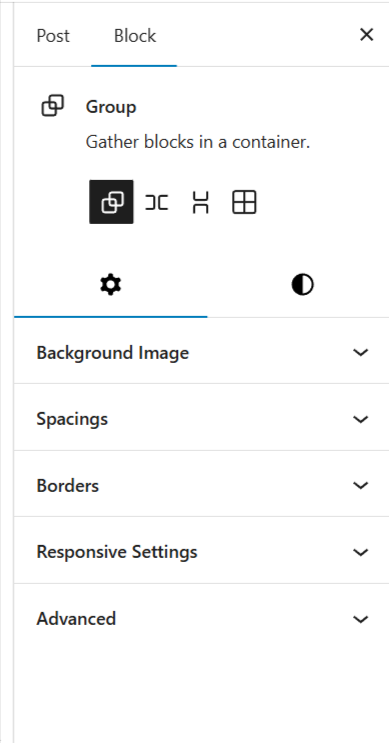
The block editor that was released in WordPress 5.0 has come a long way. In WordPress 6.7, the editing process is even smoother and more accurate. From layout changes to consistency in design, all the new features in block handling are about providing users with greater control with less effort.
One of the highlight improvements is better spacing controls. It’s now possible for users to precisely control margins, padding, and alignment for single blocks or groups of blocks with more control. This allows for more layout flexibility without having to resort to custom CSS, and that’s a huge gain for non-developer users.
Groups
No more clicking through settings one by one; users now have a more coherent, streamlined sidebar. Group blocks, commonly employed to organize content visually, now have enhanced layout presets. These enhancements minimize the need for bespoke containers and make users more confident in their page layout.
For additional visual precision, WordPress 6.7 features block outlines and more descriptive labeling. Navigation through blocks with the keyboard is now quicker and more consistent. WordPress 6.7 brings block editing closer to an end-to-end design experience, without requiring additional plugins or page builders.
WordPress’s navigation system has been one of its more clunky. That’s changing big time in WordPress 6.7. The Navigation block gets a major improvement to simplify menu building and editing into a quicker, more visually intuitive process for everyone. One of the most visibly enhanced features is the live preview of menus. You now get to see precisely how your links, dropdowns, and organization will look in the front end.
This visual-centric method eliminates the guessing that usually causes users to toggle back and forth between the preview and the editor. You can reorder, delete, or edit multiple menu items directly from the block sidebar without digging through nested settings. This simplifies workflow for content-intensive sites like eCommerce or news sites.
Expert Tip
Focus on building relationships, not just links. High-quality backlinks from authoritative websites in your niche carry far more weight than a large number of low-quality links. Engage with industry influencers, contribute valuable content, and participate in relevant communities. This approach naturally boosts your website authority while improving long-term SEO results.

Why These Changes Matter for Your Website
The changes in WordPress 6.7 aren’t merely about new features; they have a direct bearing on how effectively you can construct, maintain, and grow your site. For small business owners and content creators, these updates lower the technical hurdle to professional, refined sites with little effort or expense.
Better pattern management and block improvements allow you to now construct full pages from reusable components, which simplifies your workflow. This saves hours for site administrators, marketers, and bloggers who work on regular content updates. By making it easier to create and work with menus, WordPress 6.7 makes it easier for visitors to get around your site, enhancing engagement and conversions.
Business Site
Just revising your business site, having pre-designed mobile-friendly layouts means fewer design decisions and quicker deployment, something every businessperson will welcome. Performance enhancements built into WordPress 6.7, like improved lazy loading and faster block rendering, impact site speed and Core Web Vitals. Faster sites result in decreased bounce rates and increased retention.
Collectively, these improvements in WordPress 6.7 decrease dependency on third-party plugins or custom code, allowing for a more stable, scalable, and secure website environment. These updates provide actual, tangible improvements to your online presence. Hostonce hosting to make sure your grid-rich layouts load fast and perform consistently.
How to Prepare for WordPress 6.7
- Take a Complete Backup of Your Site: This means backing up your site files (themes, plugins, uploads) and database (posts, pages, settings). Use a reliable plugin like UpdraftPlus, BlogVault, or Jetpack Backup, or make manual backups via cPanel or FTP and phpMyAdmin.
- Try Out the Update in a Staging Environment: A staging environment is a copy of your site where you can review updates without impacting real users. SiteGround and WP Engine have one-click staging.
- Plugin and Theme Developers: Many plugin and theme developers release compatibility updates around major WordPress releases.
- Check Your Use of Patterns and Reusable Blocks: WordPress 6.7 adds synced and unsynced pattern choices, enhanced organization features, and inline editing improvements.
- Check Navigation Menus for Compatibility: With the Navigation block overhaul in WordPress 6.7, users get visual previews, grouping options, and improved editing features.
Conclusion
Enhancing site performance and being current with the newest web standards. Develop client sites; this upgrade makes you ready for WordPress’ future. To get more valuable information about known vulnerabilities and how to Hostonce keep websites safe, you can follow us on Twitter (X).
WordPress 6.3 Update: A Detailed Overview
By Festus Nkopuruk on November 7, 2025FAQs
Will WordPress 6.7 destroy my current site or plugins?
The upgrade to WordPress 6.7 should not cause any breakage for most cases, but only if themes and plugins are up to date and follow WordPress coding standards.
Can I use the new pattern tools without a block theme?
Yes, WordPress 6.7 new pattern tools can also be used with classic themes, yet the experience is restricted to some extent.
Does WordPress 6.7 assist with SEO?
Yes. WordPress 6.7 also comes with a number of performance improvements like improved lazy loading, improved rendering, and improved accessibility.
Where do I find out more about future features?
For the latest news on WordPress 6.7 and upcoming releases, check the WordPress Core Development Blog.

Hostonce is the #1 WordPress Host
Ranked by 930+ customers in G2's Best Software Awards.
