





Today, VPS hosting is used by more than 24 million websites worldwide. Optimizing VPS performance is crucial for the millions of websites that depend on VPS for their infrastructure. For performance, scalability, and stability, it becomes essential to guarantee robust disk I/O, sufficient CPU and RAM, and low latency.
Optimizing VPS performance/VPS database performance is essential to guaranteeing the effectiveness and responsiveness of the system. Without it, users may become frustrated due to delayed requests and bottlenecks. Consequently, search engine rankings decline, and website abandonment rates rise.

5 Signs Your Website Needs a VPS Upgrade (And When to Switch)
By Javeria Riaz on May 29, 2026Key Takeaways
- Database performance may make or break user experience and, ultimately, your success in the fast-paced world of online business. You must optimize database performance on your VPS to ensure your apps function smoothly and effectively.
- To enhance security and performance, upgrade your VPS’s operating system, web server, and database on a regular basis.
- Clean up unnecessary indexes, adjust MySQL settings, and utilize query caching where necessary to optimize database performance.
- Use a Content Delivery Network (CDN) such as BunnyCDN or Cloudflare to lower server load and latency.
- To increase speed and save resources, use caching solutions like Varnish, Memcached, or Squid.
VPS Performance And Database Optimization
A virtual private server, or VPS, is similar to having a virtual portion of a larger server environment. A VPS hosting provides you with dedicated resources like CPU, RAM, and storage, in contrast to shared hosting. This guarantees stability in performance and offers the flexibility needed to host different applications.
- Faster database queries enhance the user experience because they produce quicker application responses.
- An efficient database makes better use of server resources, which lowers expenses and increases scalability.
- Efficient databases handle larger data volumes and traffic spikes and are less likely to produce errors.
- Maintaining database optimization can lower vulnerabilities and improve overall security.
Database performance optimization refers to the methodical improvement of a database’s server resource management efficiency. This effectively handles concurrent connections or users and maximizes query processing. Such a procedure makes use of many strategies to improve overall system performance and reduce reaction times and resource consumption.
Notably, this is especially crucial in areas with a lot of traffic. Enhancing user experience, cutting expenses, increasing system efficiency, and gaining a competitive edge are all possible with improved database performance.
How To Determine The Speed Of Your Database For VPS Performance?
It’s difficult to answer this question because there are so many factors:
Response time: This indicates how long it takes the database to perform a query and provide the user with the results. One may contend that it’s not the most precise metric available. Every query is unique, and a variety of factors influence the typical response speeds you receive at any particular moment.
Query performance: The query’s structure greatly influences how long the database takes to provide the required data. Database managers can identify slow queries and take the appropriate action to optimize them by keeping an eye on each query’s performance using profilers like pgAdmin or MySQL Workbench.
Query Throughput: Query throughput refers to the amount of data a database handles simultaneously. On the one hand, to scale the hosting environment appropriately, administrators need to know this volume. But they also need to understand how the information is provided.
Open database connections: These connections allow users of software programs to communicate with the database. Your bandwidth usage increases with the number of open connections you have at any given time. The new connection requests, however, have an even greater effect on resource utilization and performance, which is why connection managers such as PgBouncer or ProxySQL are essential.

Optimize WordPress Database Now!
Get the fastest performance and keep your WordPress database optimized with HostOnce’s fastest WordPress hosting solutions.
Important Techniques for VPS Performance and Database Optimization
Here are some important techniques for VPS performance/VPS database optimization:
Update the VPS’s Software
The first thing we can do to improve database speed is to update the VPS’s software and system packages. Because outdated software may overlook recent security fixes like preventing DDoS attacks and performance enhancements, this operation is essential. Delaying software updates could also reveal server vulnerabilities that could cause data loss and render the website unavailable.
- MySQL Update: Performance can be greatly improved by up to 40% by updating the MySQL database service. Better indexing, query optimization, increased parallelism, and many other benefits are also a part of this. MySQL 8.4, which offers a solid and dependable version with long-term support, was the most recent version when we authored the blog post.
- PHP Update: Updating the PHP version can greatly impact MySQL performance by speeding up script execution, reducing CPU consumption, and improving RAM efficiency. Additionally, it will improve MySQL libraries like PDO and MySQLi, which will lead to better connection pooling and support for new MySQL capabilities.
- Web Server Update: Updating the web server (Apache, Nginx, or LiteSpeed) can indirectly impact MySQL speed, especially in how the web application communicates with it. Among other advantages, it can effectively manage more concurrent requests, cut down on timeouts, minimize query queuing, and shorten MySQL wait times.
Expert Tip
Make a backup of the MySQL files, or even better, the entire VPS, before updating MySQL to a higher version. The MySQL version cannot be downgraded once it has been upgraded. We won’t be able to go back to the prior version and will lose the files if the web application isn’t functioning with a higher version. Because of this, it is crucial to have a backup plan before acting. So, don’t forget to first test updates in a staging environment! You don’t want a compatibility problem to cause your live website to crash.

Selecting the Appropriate Storage Engine
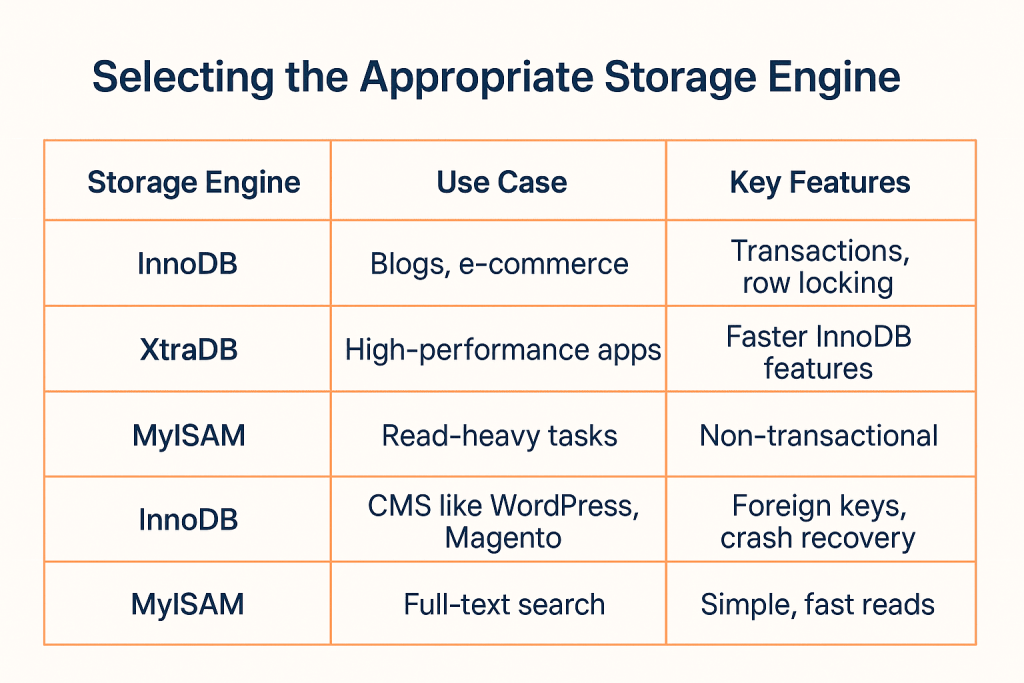
One component in charge of managing databases and storing and retrieving data is the storage engine.
- MySQL’s default storage engine is InnoDB. The InnoDB storage engine is used by the most recent applications, including blogs, e-commerce business websites, and often updated programs like WordPress, Magento, Drupal, etc. Transactions, foreign keys, row-level locking, and crash recovery are all supported by the InnoDB storage engine.
- MariaDB uses XtraDB, an improved version of InnoDB with comparable transactional features and speed enhancements.
- With restrictions on data integrity and parallelism, MyISAM is a non-transactional storage engine used for read-intensive tasks like full-text searching. MyISAM was the default storage engine option before MySQL 5.5.
Optimize Your Slow Database Now!
Give your databse the speed and performance it deserves with optimized and premium hosting solutions by HostOnce.
Database Tuning Configuration For VPS Performance
Modifying your database setup settings is the first step in database optimization. The operation mode of every database system, including MySQL, PostgreSQL, and MongoDB, is determined by a set of adjustable settings. Memory allocation, query caching, and connection management are common options to check.
The most significant modifications to MySQL and MariaDB databases are as follows:
- Set innodb_buffer_pool_size to between 70 and 80 percent of the RAM that is available. Use about 3GB for a 4GB VPS.
- Start with 1-2GB for innodb_redo_log_capacity (which replaces the previous innodb_log_file_size setting) for MySQL 8.0.30+.
- max_connections: Set to at least 100 and four times your CPU cores. The majority of tiny sites only require 20–50.
- For MySQL 5.7/MariaDB, query_cache_size ranges from 128M to 256M (MySQL 8.0 eliminated query cache).
Frequent Monitoring Is Necessary
VPS performance/database optimization is a continuous process that needs to be maintained on a regular basis. Analyze your database logs and performance indicators on a regular basis to find and fix problems quickly. The following are some crucial monitoring tools:
- htop or top: Track CPU and memory consumption in real time.
- iostat command: Use apt-get install sysstat to check the disk’s I/O performance.
- List of MySQL Processes: To view active queries, run SHOW PROCESSLIST.
- Slow Query Log: Turn on the Slow Query Log to identify searches that take more than two seconds.
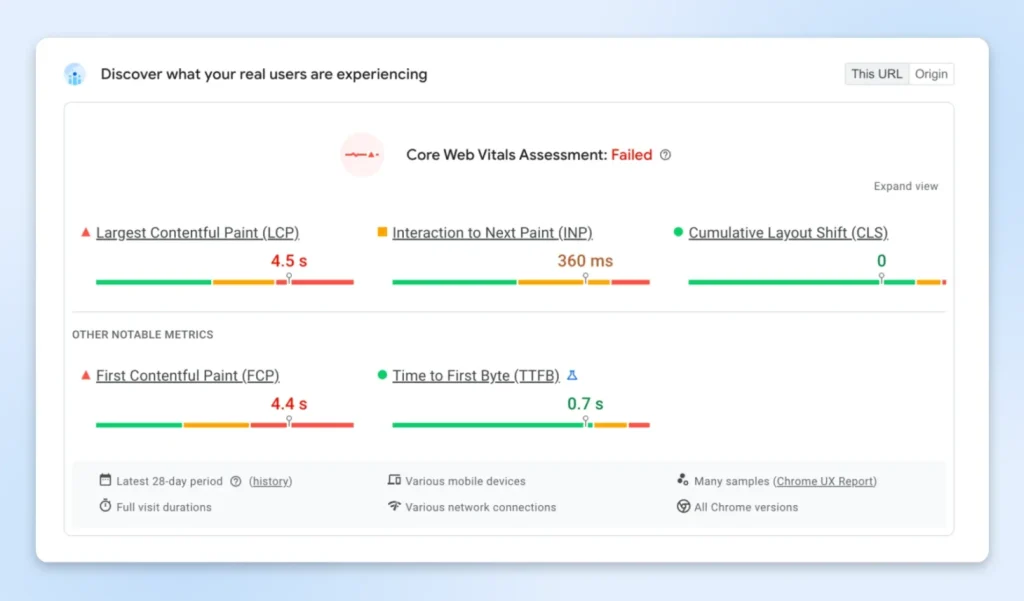
Using tools like GTmetrix or Google PageSpeed Insights, you set up a weekly assessment, paying particular attention to pages that are frequently visited by your database, such as product pages, search results, or blog post archives.
Use Database Indexing to Make Queries Faster
Your database can effectively find and access data thanks to indexes. Every query could result in an expensive full table scan without enough indexing, which would slow down performance. Here are some basic database pointers for efficient indexing:
Use a plugin such as Index WP MySQL For Speed for WordPress, follow its instructions, and you’re done.
However, before indexing the database, you must back up the website.
When To Include Indexes
- For items, blog entries, users, etc., you have big tables with thousands of records.
- Foreign key columns that you regularly search or filter
- Many columns are utilized in “WHERE” or “JOIN” clauses.
When Not To Include Indexes
- Small tables (those with fewer than 1,000 rows typically show no performance improvements)
- Frequently changing columns (indexes slow down “INSERT/UPDATE” processes)
- You want to be creative because you don’t have much room (indexes take up space).
Claim Your Business Domain Now!
Secure a unique online identity that reflects your business idea. Register your error-free websites in seconds with HostOnce!
Conclusion
The ability of a database system to manage queries, data retrieval, and transactions is referred to as database performance. All of these are necessary elements for a Linux server-based website.
By optimizing queries, implementing indexing, utilizing caching, and fine-tuning the database, you may improve database speed. In addition to using a CDN, updating server packages, upgrading server resources, and modifying web server settings. The content of a website and the code of a web application can occasionally be affected by database performance.
FAQs
How do you test VPS performance?
Well-known resources like SpeedTest and Fast offer thorough metrics to assess your VPS's network capabilities. After selecting a tool, use SSH or a remote desktop connection to access your VPS. To obtain the most accurate results, make sure that no other programs are using bandwidth throughout the test.
Why is my VPS so laggy?
The quantity of system resources you have on your account is typically the cause of slow servers. We must make sure that our web project has enough CPU, RAM, storage space, and bandwidth.
How does performance go better when I upgrade my VPS?
Increasing CPU, RAM, and storage (such as NVMe SSDs) improves VPS speed by enabling your server to manage more connections, lower bottlenecks, and run queries more quickly.
How to optimize VPS database performance?
- Update the VPS software.
- Eliminate Database Bloat.
- Indexing databases.
VPS vs Managed WordPress Hosting: The Complete Guide for Your Business
By Javeria Riaz on October 11, 2025
Hostonce is the #1 WordPress Host
Ranked by 930+ customers in G2's Best Software Awards.